
2. Some Python basics#
Before using ModelFlow with the World Bank’s MFMod models, users will have to understand at least some basic elements of python syntax and usage. Notably they will need to understand about packages, libraries and classes, and how to access them.
In this chapter - Python Basics
This chapter provides an introduction to essential Python concepts for using World Bank models in ModelFlow. It provides a foundational understanding of Python, equipping users with the skills to engage in macroeconomic modeling tasks.
Readers familiar with python can safely skip this chapter.
Key points include:
Getting Started with Python:
Launch Python through the terminal, an IDE, or Jupyter Notebook.
Use the Anaconda environment for managing dependencies and versions.
Core Concepts:
Variables and data types: Store and manipulate data using integers, floats, strings, and lists.
Control structures: Use loops and conditionals for automating repetitive tasks and decision-making.
Libraries and Packages:
Leverage Python libraries like
pandasfor data handling andmatplotlibfor visualization.Import libraries, modules, and classes to extend Python’s functionality.
Interactivity in Jupyter Notebook:
Write, execute, and document Python code interactively.
Use context-sensitive help and auto-completion for efficient coding.
Best Practices:
Organize your code for readability and reusability.
Validate results step-by-step to ensure correctness.
2.1. Starting python in windows#
To begin using ModelFlow, python itself needs to be started. This can be done either using the Anaconda navigator or from the command line shell. In either case, the user will need to start python and select the ModelFlow environment.
2.1.1. Anaconda navigator#
Start Anaconda Navigator by typing Anaconda in the Start window and opening the Navigator (see Figure).
From Anaconda Navigator select the
ModelFlowenvironment (see figure)
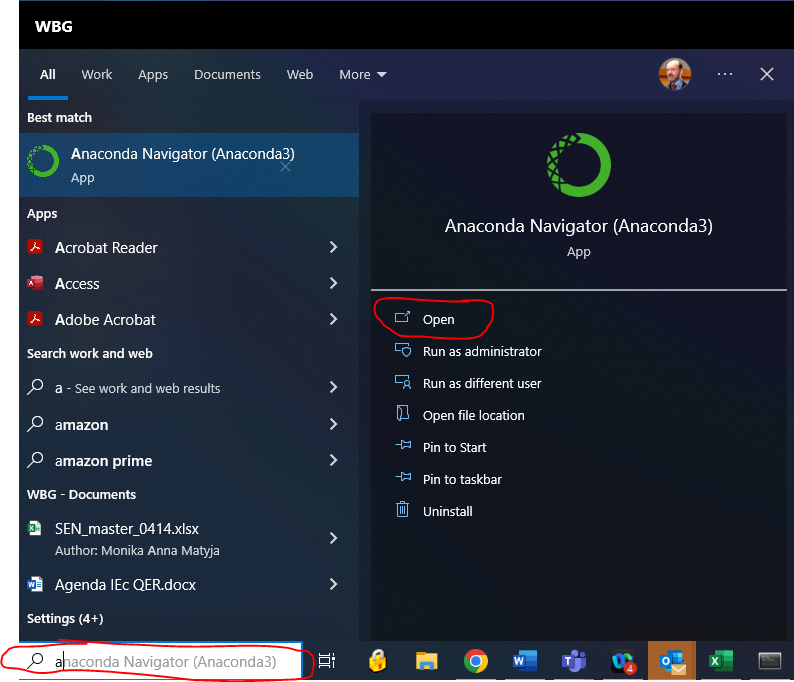
Fig. 2.2 A newly created Jupyter Notebook session#
Once the environment is selected the user can either select a command line environment, an IDE or
Jupyter Notebookby clicking on the appropriate icon. Options typically include:Jupyter Notebook environment
The command line environment
A programming IDE environment
In the figure below the user is selecting the Jupyter Notebook environment.
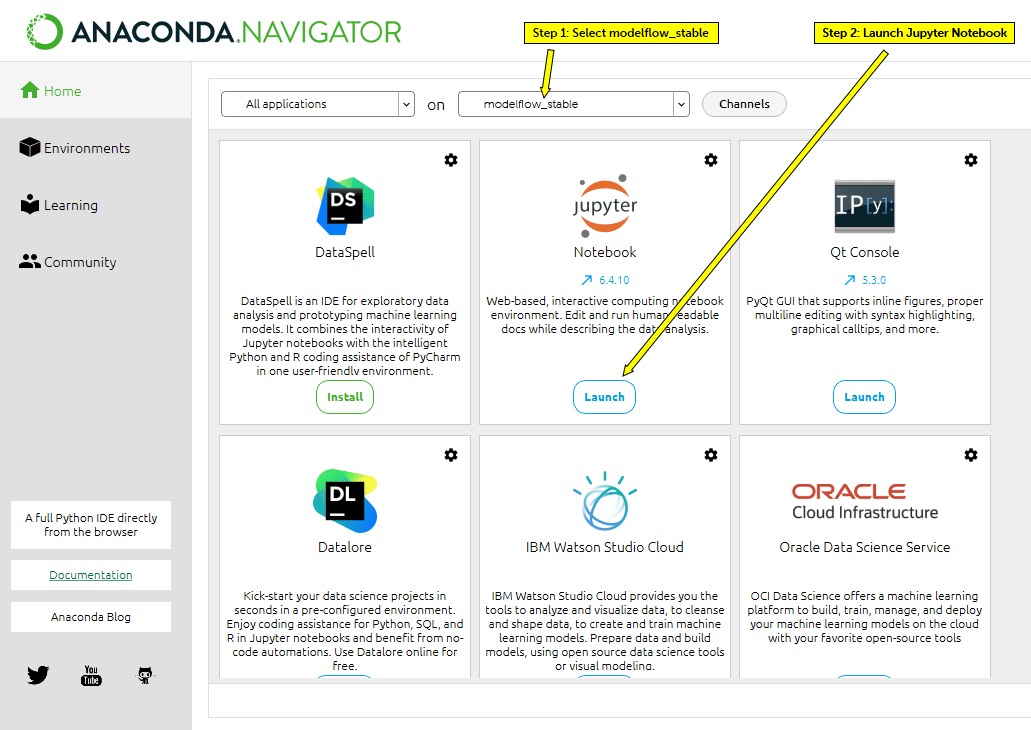
Fig. 2.3 A newly created Jupyter Notebook session#
Note
If you start Jupyter Notebook with Anaconda Navigator you will need to select which environment you want jupyter to be running in (see the drop-down at the top center of the above screen shot), To have access to ModeFlow, you will need to select an environment into which ModelFlow has been installed (there could be more than one).
2.2. Python packages, libraries and classes#
Some features of python are built-in. Others (like ModelFlow) are optional. Optional packages build on basic python features (and those of other packages) but have to be installed separately.
A python class is a code template that defines a python object. Classes can have properties [variables or data] associated with them and methods (behaviors or functions) associated with them. In python, a class is created by the keyword class. An object of type class is created (instantiated) using the class’s “constructor” – a special method that creates an object that is an instance of a class.
A module is a Python object consisting of Python code. A module can define functions, classes and variables. A module can also include runnable code.
A python package is a collection of modules that are related to each other. When a module from an external package is required by a program, that package (or module in the package) must be imported into the current session in order for its modules to be accessible.
A python library is a collection of related modules or packages.
ModelFlow is a python package that inherits (build on or adds to) the methods and properties of other python classes like pandas, numpy and matplotlib.
2.3. Importing packages, libraries, modules and classes#
Some libraries, packages, and modules are part of the core python package and will be available (importable) from the get-go. Others are not, and need to be installed before importing them into a session.
If you followed the ModelFlow installation instructions you have already downloaded and installed on your computer all the packages necessary for running World Bank models under ModelFlow. But to work with them in a given Jupyter Notebook session or in a program context, you will also need to import them into your session before you call them.
Installation downloads a package’s programs from the internet into a specific environment on the user’s machine, making them available to be imported when required. Once it has been installed, the environment into which it was installed must be activated and the package must be imported into each python session where it is to be used.
Typically a python program will start with the importation of the libraries, classes and modules that will be used. Because a Jupyter Notebook is essentially a heavily annotated program, it also requires that packages used be imported.
2.3.1. Import a package#
As described above: packages, libraries and modules are containers that can include other elements. Take for example the package Math.
To import the Math Package we execute the command import math. Having done that we can call the functions and data that are defined in it (math is a standard package so we do not need to install it separately).
# the "#" in a code cell indicates a comment, test after the # will not be executed
import math

# Now that we have imported math we can access some of the elements identified in
# the package.
# For example math contains a definition for pi, we can access that by executing
# the pi method of the library math

math.pi
3.141592653589793
Note
Running code in Jupyter Notebook causes the results of the code to be displayed. As discussed in Chapter 4, a code cell in Jupyter Notebook can be executed either by keystroke short-cut (Control-Enter or Shift-Enter) or by clicking on the Run button on the Jupyter menu bar.
2.3.2. Import specific elements or classes from a module or library#
The python package math contains several functions and classes.
Rather than importing the whole package (as above), these classes can be imported directly using the from syntax.
from math import pi,cos,sin
When imported in this fashion, the user does not have to precede the class or method with the name of their library. The above from math import pi,cos,sin command imports the pi constant and the two functions cos and sin from the math package directly and allow the user to call them using their names without preceding them with math..
Compare these calls with the one in the preceding section – there the call to the method pi has to be preceded by its namespace designator math. i.e. math.pi. Below we import pi directly and can just call it with pi.
from math import pi,cos,sin

print(pi)
print(cos(3))
3.141592653589793
-0.9899924966004454
2.3.3. import a library but give it an alias#
An imported library/packages can also be given an alias, that is hopefully shorter than its official name but still obvious enough that the user knows what class is being referred to.
For example import math as m allows a call to pi using the more succinct syntax m.py.
import math as m
print(m.pi)
print(m.cos(3))
3.141592653589793
-0.9899924966004454
2.3.4. Standard aliases#
Some packages are so frequently used that by convention they have been “assigned” specific aliases.
For example:
Common aliases
Alias |
aliased package |
example |
functionality |
|---|---|---|---|
pd |
pandas |
import pandas as pd |
Pandas are used for storing and retrieving data |
np |
numpy |
import numpy as np |
Numpy gives access to some advanced mathematical features |
plt |
matplotlib |
import matplotlib as plt |
matplotlib provides a wide-range of routines for plotting numerical data |
You don’t have to use those conventions but it will make your code easier to read by others who are familiar with them.