Running the Analysis
Learning objective
By the end of this page you'll be able to kick off a full analysis run, choose between Run All and Run Incomplete, and know what happens (and how to recover) if a long run gets interrupted.
Once every dimension is configured (see the three previous pages), you're ready to run the whole analysis.
Run All vs Run Incomplete
Start the whole thing running from the Run All button at the bottom of the panel, or Run Incomplete to skip anything that's already finished. Run All gives a warning that any previous analysis you've done will be deleted; it will not delete the working files you've made, but it will delete any analysis outputs. It then works through every indicator, factor and dimension in order, calculating scores across the grid, and loads each result onto the map as it completes.
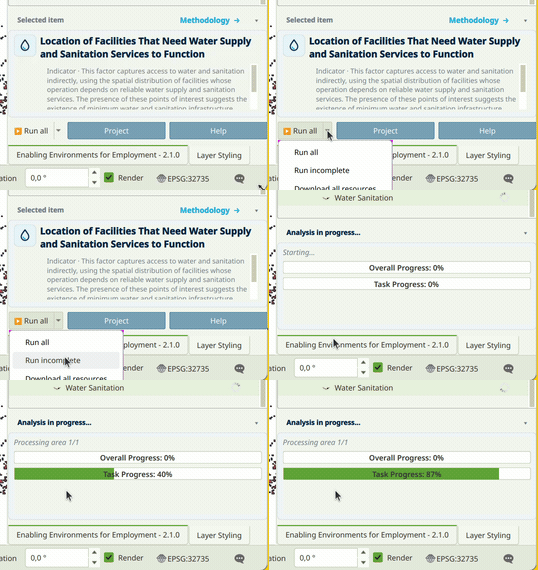
To rerun a single item after changing something, right-click it and choose Clear Item, then right-click again and, holding Shift, choose Run Item Workflow. This is covered already on The Interface.
This can take a while
Depending on the size of the country and whether you're running a regional, national or local-scale analysis, a full run can take a while, particularly for a large country at national or local grid resolution. Leave it running in the background rather than expecting it to finish in a few seconds.
If something interrupts it
The project saves its progress to disk as each item finishes, not just at the end of the whole run, so a crash doesn't throw away work that's already done. If QGIS crashes, or you need to shut down or restart the computer partway through a run, reopen the project afterwards and click Run Incomplete rather than Run All: it picks up from whichever indicator, factor or dimension it reached, instead of starting the whole analysis over from scratch.
Recap
- Run All runs everything and clears previous outputs first; Run Incomplete only runs what hasn't finished yet.
- A full run can take a while on a large country or a fine grid. Let it run in the background.
- Progress is saved to disk after every item completes. If QGIS crashes or the computer restarts mid-run, reopen the project and click Run Incomplete to carry on rather than starting over.