Using BlackMarble Nighttime Lights Data in R

Provides an introduction to spatial analysis in R and for working with BlackMarble nighttime lights data.

1 Download Course

Code
#### Download Course
install.packages("usethis")

library(usethis)

use_course("https://github.com/worldbank/ntl-training/archive/refs/heads/main.zip",
           destdir = "CHANGE THIS LOCATION")

#### Install R Packages
# List of packages
packages <- c(
  "learnr", "tidyverse", "sf", "terra", "geodata", "osmdata", 
  "leaflet", "blackmarbler", "tidyterra", "exactextractr", 
  "h3jsr", "fixest", "janitor", "here"
)

# Install missing packages
installed <- packages %in% rownames(installed.packages())
if (any(!installed)) {
  install.packages(packages[!installed])
}
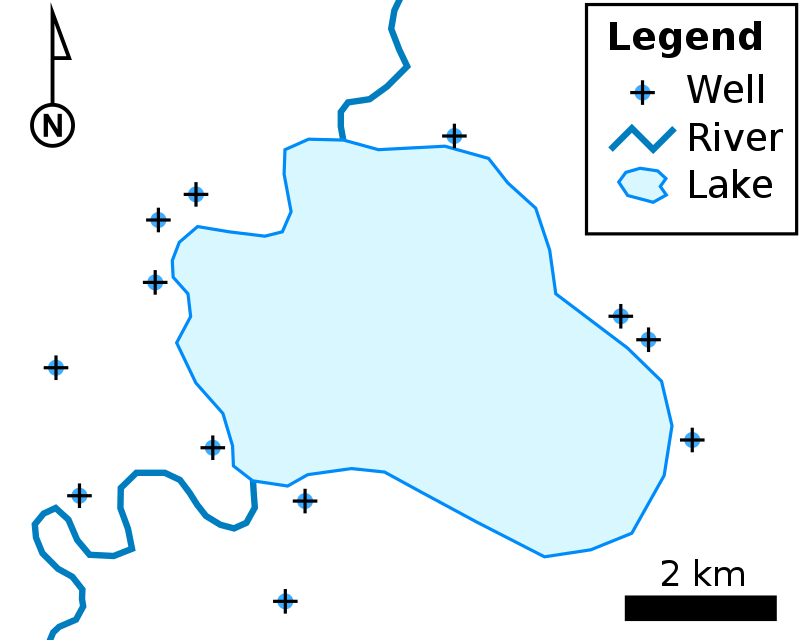
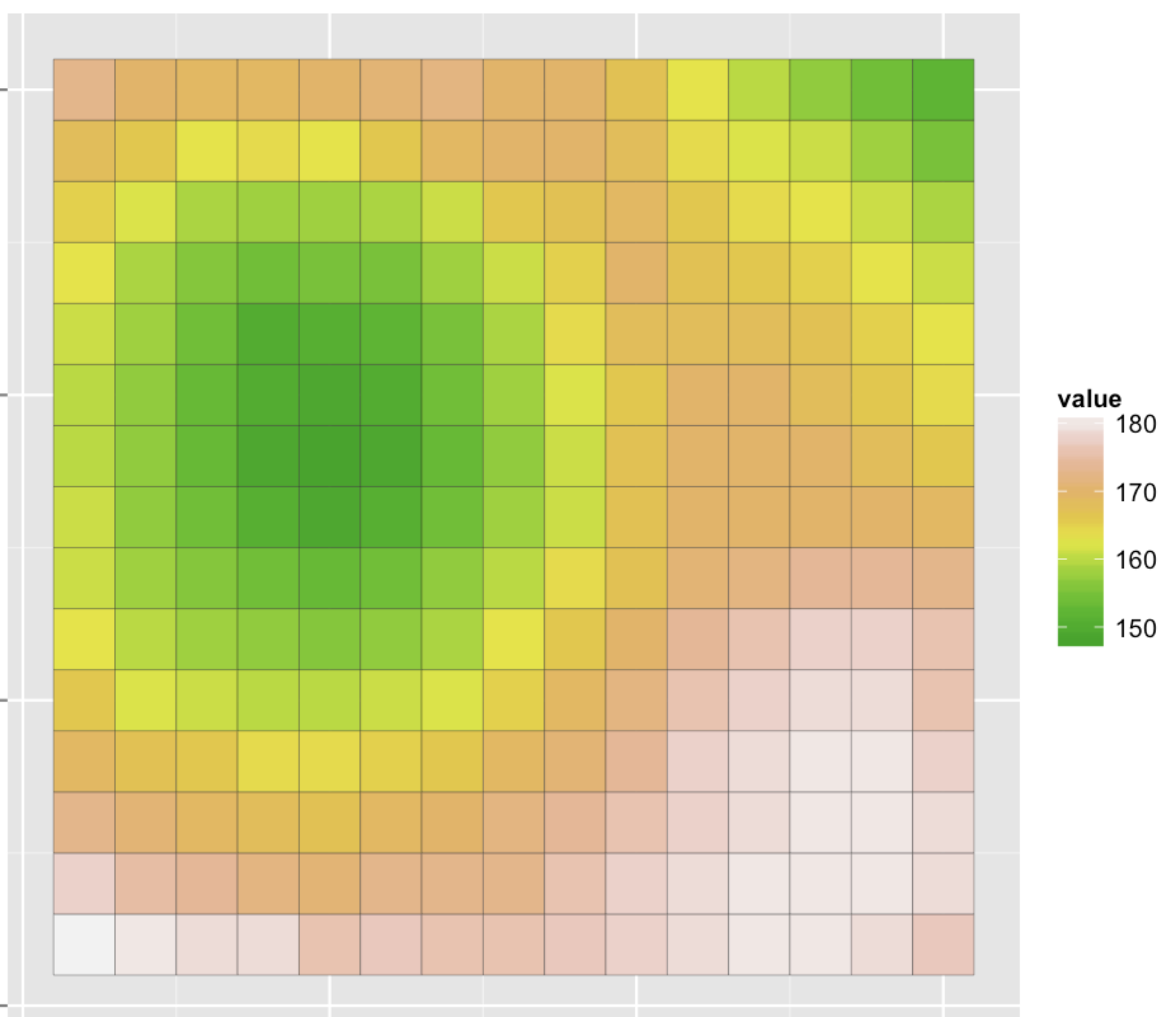
2 Spatial Data

2.1 Data Types

There are two main types of spatial data: (1) vector data and (2) raster data.

Vector Data Raster Data
What Points, lines, or polygons Spatially referenced grid
Common file formats Shapefiles (.shp), geojsons (.geojson) Geotif (.tif), NetCDF files
Examples Polygons of countries, polylines of roads, points of schools Satellite imagery
Vector Raster
Vector Raster

2.2 Coordinate Reference Systems (CRS)

  • Coordinate reference systems (CRS) are frameworks that define locations on earth using coordinates.

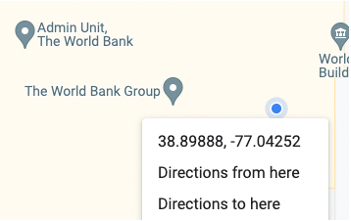
  • For example, the World Bank is at latitude 38.89 and longitude -77.04.

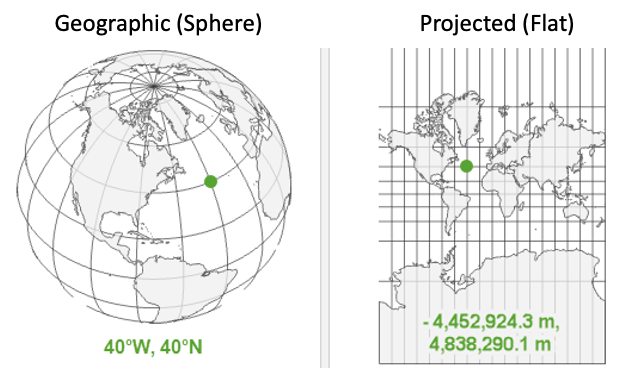
  • There are many different coordinate reference systems, which can be grouped into geographic (or spherical) and projected coordinate reference systems. Geographic systems live on a sphere, while projected systems are ``projected’’ onto a flat surface.

2.3 Geographic Coordinate Systems

2.3.1 Overview

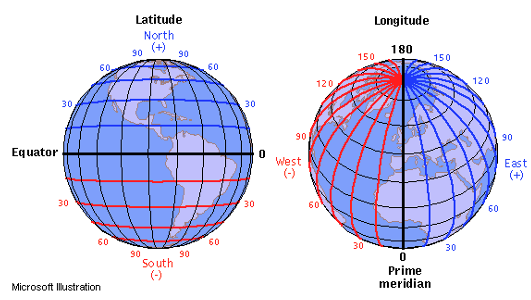
Units: Defined by latitude and longitude, which measure angles and units are typically in decimal degrees. (Eg, angle is latitude from the equator).

Latitude & Longitude:

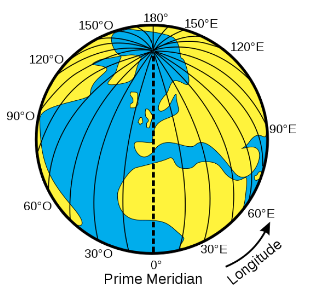
  • On a grid X = longitude, Y = latitude; sometimes represented as (longitude, latitude).
  • Also has become convention to report them in alphabetical order: (latitude, longitude) — such as in Google Maps.
  • Valid range of latitude: -90 to 90
  • Valid range of longitude: -180 to 180
  • {Tip} Latitude sounds (and looks!) like latter

2.3.2 Distance on a sphere

  • At the equator (latitude = 0), a 1 decimal degree longitude distance is about 111km; towards the poles (latitude = -90 or 90), a 1 decimal degree longitude distance converges to 0 km.
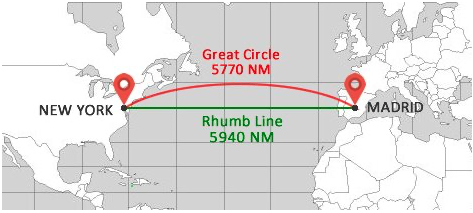
  • We must be careful (ie, use algorithms that account for a spherical earth) to calculate distances! The distance along a sphere is referred to as a great circle distance.
  • Multiple options for spherical distance calculations, with trade-off between accuracy & complexity. (See distance section for details).
Vector Raster

2.3.3 Datums

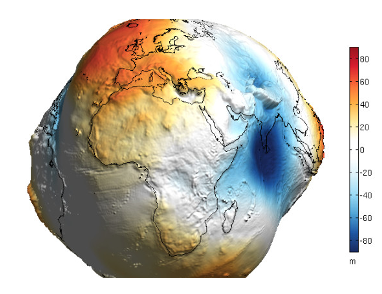
  • Is the earth flat? No!
  • Is the earth a sphere? No!
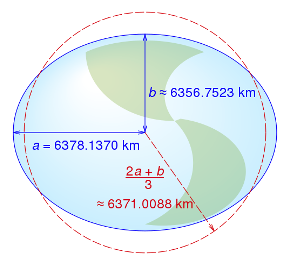
  • Is the earth a lumpy ellipsoid? Yes!

The earth is a lumpy ellipsoid, a bit flattened at the poles.

  • A datum is a model of the earth that is used in mapping. One of the most common datums is WGS 84, which is used by the Global Positional System (GPS).
  • A datum is a reference ellipsoid that approximates the shape of the earth.
  • Other datums exist, and the latitude and longitude values for a specific location will be different depending on the datum.
Vector Raster

2.4 Projected Coordinate Systems

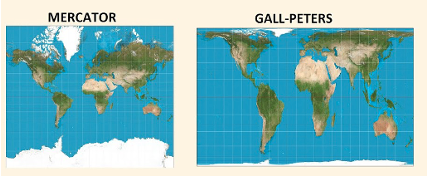
Projected coordinate systems project spatial data from a 3D to 2D surface.

Distortions: Projections will distort some combination of distance, area, shape or direction. Different projections can minimize distorting some aspect at the expense of others.

Units: When projected, points are represented as northings and eastings. Values are often represented in meters, where northings/eastings are the meter distance from some reference point. Consequently, values can be very large!

Datums still relevant: Projections start from some representation of the earth. Many projections (eg, UTM) use the WGS84 datum as a starting point (ie, reference datum), then project it onto a flat surface.

Click here to see why Toby looks so confused Different Projections
Vector Raster

2.5 Referencing Coordinate Reference Systems

  • There are many ways to reference coordinate systems, some of which are verbose.
  • PROJ (Library for projections) way of referencing WGS84 +proj=longlat +datum=WGS84 +no_defs +type=crs
  • EPSG Assigns numeric code to CRSs to make it easier to reference. Here, WGS84 is 4326.

2.6 CRS as Units

Whenever have spatial data, need to know which coordinate reference system (CRS) the data is in.

  • You wouldn’t say “I am 5 away”
  • You would say “I am 5 [miles / kilometers / minutes / hours] away” (units!)
  • Similarly, a “complete” way to describe location would be: I am at 6.51 latitude, 3.52 longitude using the WGS 84 CRS

2.7 Quiz

Explain what’s going on here.

3 Spatial Analysis in R

3.1 Packages for spatial data

There are many packages for working with spatial data. Below summarizes some of the most commonly used packages for spatial analysis.

  • sf: Package for working with vector data. (sf = simple features)
  • terra: Package for working with both raster data and vector data.
  • tidyterra: Provides methods common to tidyverse for working with terra objects; also provides additional geoms for plotting spatial data using ggplot
  • leaflet R interface to leaflet, a JavaScript library for interactive maps
Note: Before sf, the sp package was used; before terra, the raster package was used. When googling/asking AI about spatial data analysis in R, you may come across these packages. Answers using these packages may be out of date. In particular, the sp package handles spatial data notably different than sf.
  • sp objects are similar to shapefiles; a shapefile isn’t one file, it’s a collection of files—one file contains the geometries (shapes), another contains the CRS, another contains the data, etc. Similarly, sp files were a list—one item of the list contained the geometries (shapes), another item contained the CRS, etc.
  • sf objects are set up more similar to geojsons, where each row of the dataframe has a geometry column.

3.2 Spherical Geometry in s2

Often, spatial data comes in the WGS 84 CRS (EPSG:4326). This is a geographic/spherical coordinate reference system where the unit of analysis is decimal degrees. The sf package makes it easy to compute distances and areas in terms of meters, taking into account the curvature of the earth. For this, sf relies on the s2 library developed by Google which facilitates quickly computing distances and areas.

The s2 library uses a system of spatial grids and relies on great circle distance formula for distance calculations; for more information, see here. While the sf package uses s2 by default, it can be turned off using sf_use_s2(false) (but use caution when doing so).

Note: Instead of relying on s2, there are two other common ways of computing distances/areas.
  • Project data: One approach is to project the data, so that the data is represented on a 2-dimensional surface and where the units are something like meters (meters are a common unit for projected CRS, but not always used; some US projected CRSs use feet). When projected, we can rely on standard formula for calculating distances/areas—such as the distance formula for distances. However, this approach requires picking a projected CRS that is accurate for the location.
  • Spherical Trigonometry: One approach to stay on a geographic CRS and use more advanced equations that account for being on a sphere. For example, for calculating distances, a number of great circle distance formulas exist—such as the Haversine Formula, Vincenty’s Formula, etc. The geosphere package facilitates using these. However, these formula can be slow to implement for large numbers of observations. The s2 library does rely on these formula; however, it uses them in combination with other methods.

4 Vector Data: Basics

Note

Summary of functions

  • st_as_sf(): Convert object to sf object
  • read_sf(): Read spatial file
  • st_crs(): Get CRS of sf object (can also be used to assign, eg st_crs(OBJECT) = 4326; but use carefully)
  • st_geometry_type(): Check geometry type
  • st_area(): Determine area of polygon
  • st_length(): Determine length of polyline

4.1 Points

Here we load a csv file that has latitude and longitude information. We can convert this to a spatial file using the st_as_sf() function. We know from the data metadata that the data is in ESPG:4326

Code
gf_df <- read_csv(here("data", "gas_flaring", "finaldata", "gas_flaring_nga.csv"),
                  show_col_types = F)

head(gf_df)
# A tibble: 6 × 12
  country latitude longitude    bcm m_mscfd  year field_type field_name 
  <chr>      <dbl>     <dbl>  <dbl>   <dbl> <dbl> <chr>      <chr>      
1 Nigeria     5.62      6.82 0.110    10.6   2012 OIL        Izombe     
2 Nigeria     5.67      5.27 0.0590    5.71  2012 OIL        Abiteye    
3 Nigeria     5.86      5.13 0.112    10.8   2012 OIL        Benin River
4 Nigeria     5.82      5.20 0.127    12.3   2012 OIL        Dibi       
5 Nigeria     5.78      5.43 0.0649    6.28  2012 OIL        Makaraba   
6 Nigeria     5.92      5.02 0.0753    7.29  2012 OIL        Opuekeba   
# ℹ 4 more variables: field_operator <chr>, location <chr>, flare_level <chr>,
#   flaring_vol_million_m3 <dbl>
Code
gf_sf <- gf_df %>%
  st_as_sf(coords = c("longitude", "latitude"),
           crs = 4326)

head(gf_sf)
Simple feature collection with 6 features and 10 fields
Geometry type: POINT
Dimension:     XY
Bounding box:  xmin: 5.01622 ymin: 5.619424 xmax: 6.815036 ymax: 5.916131
Geodetic CRS:  WGS 84
# A tibble: 6 × 11
  country    bcm m_mscfd  year field_type field_name  field_operator location
  <chr>    <dbl>   <dbl> <dbl> <chr>      <chr>       <chr>          <chr>   
1 Nigeria 0.110    10.6   2012 OIL        Izombe      Addax          ONSHORE 
2 Nigeria 0.0590    5.71  2012 OIL        Abiteye     Chevron        ONSHORE 
3 Nigeria 0.112    10.8   2012 OIL        Benin River Chevron        ONSHORE 
4 Nigeria 0.127    12.3   2012 OIL        Dibi        Chevron        ONSHORE 
5 Nigeria 0.0649    6.28  2012 OIL        Makaraba    Chevron        ONSHORE 
6 Nigeria 0.0753    7.29  2012 OIL        Opuekeba    Chevron        ONSHORE 
# ℹ 3 more variables: flare_level <chr>, flaring_vol_million_m3 <dbl>,
#   geometry <POINT [°]>

4.2 Polygons & Polylines

Load data

Code
adm1_sf <- read_sf(here("data", "gadm", "nga_adm1.geojson"), quiet = T)

Functions that work on dataframes to explore data work on sf objects

Code
# Examine first few observations
print(head(adm1_sf))
Simple feature collection with 6 features and 1 field
Geometry type: MULTIPOLYGON
Dimension:     XY
Bounding box:  xmin: 5.376527 ymin: 4.270418 xmax: 13.72793 ymax: 12.5025
Geodetic CRS:  WGS 84
# A tibble: 6 × 2
  NAME_1                                                                geometry
  <chr>                                                       <MULTIPOLYGON [°]>
1 Abia      (((7.462832 4.98177, 7.462608 4.967931, 7.466374 4.957946, 7.475896…
2 Adamawa   (((12.25072 8.172622, 12.24873 8.170198, 12.24652 8.168644, 12.2435…
3 Akwa Ibom (((8.319584 4.557639, 8.319584 4.557917, 8.319306 4.557917, 8.31930…
4 Anambra   (((6.935766 5.857954, 6.93626 5.84572, 6.932021 5.831851, 6.931631 …
5 Bauchi    (((9.752657 9.600874, 9.735358 9.567298, 9.727518 9.565032, 9.68931…
6 Bayelsa   (((6.096529 4.355138, 6.096529 4.354584, 6.096804 4.354584, 6.09680…
Code
# Examine first few observations
head(adm1_sf)
Simple feature collection with 6 features and 1 field
Geometry type: MULTIPOLYGON
Dimension:     XY
Bounding box:  xmin: 5.376527 ymin: 4.270418 xmax: 13.72793 ymax: 12.5025
Geodetic CRS:  WGS 84
# A tibble: 6 × 2
  NAME_1                                                                geometry
  <chr>                                                       <MULTIPOLYGON [°]>
1 Abia      (((7.462832 4.98177, 7.462608 4.967931, 7.466374 4.957946, 7.475896…
2 Adamawa   (((12.25072 8.172622, 12.24873 8.170198, 12.24652 8.168644, 12.2435…
3 Akwa Ibom (((8.319584 4.557639, 8.319584 4.557917, 8.319306 4.557917, 8.31930…
4 Anambra   (((6.935766 5.857954, 6.93626 5.84572, 6.932021 5.831851, 6.931631 …
5 Bauchi    (((9.752657 9.600874, 9.735358 9.567298, 9.727518 9.565032, 9.68931…
6 Bayelsa   (((6.096529 4.355138, 6.096529 4.354584, 6.096804 4.354584, 6.09680…
Code
# Number of rows
nrow(adm1_sf)
[1] 37
Code
# Filter
adm1_sf %>%
  filter(NAME_1 == "Lagos")
Simple feature collection with 1 feature and 1 field
Geometry type: MULTIPOLYGON
Dimension:     XY
Bounding box:  xmin: 2.70628 ymin: 6.373194 xmax: 4.348236 ymax: 6.707005
Geodetic CRS:  WGS 84
# A tibble: 1 × 2
  NAME_1                                                                geometry
* <chr>                                                       <MULTIPOLYGON [°]>
1 Lagos  (((3.39514 6.396528, 3.395416 6.396512, 3.395416 6.396083, 3.395416 6.…

sf specific functions

Code
# Check coordinate reference system
st_crs(adm1_sf)
Coordinate Reference System:
  User input: WGS 84 
  wkt:
GEOGCRS["WGS 84",
    DATUM["World Geodetic System 1984",
        ELLIPSOID["WGS 84",6378137,298.257223563,
            LENGTHUNIT["metre",1]]],
    PRIMEM["Greenwich",0,
        ANGLEUNIT["degree",0.0174532925199433]],
    CS[ellipsoidal,2],
        AXIS["geodetic latitude (Lat)",north,
            ORDER[1],
            ANGLEUNIT["degree",0.0174532925199433]],
        AXIS["geodetic longitude (Lon)",east,
            ORDER[2],
            ANGLEUNIT["degree",0.0174532925199433]],
    ID["EPSG",4326]]
Code
# Check geometry type
st_geometry_type(adm1_sf) %>% head()
[1] MULTIPOLYGON MULTIPOLYGON MULTIPOLYGON MULTIPOLYGON MULTIPOLYGON
[6] MULTIPOLYGON
18 Levels: GEOMETRY POINT LINESTRING POLYGON MULTIPOINT ... TRIANGLE

Area is not a variable, but we can calculate it

Code
# Calculate area
st_area(adm1_sf)
Units: [m^2]
 [1]  4744642241 34431813164  6765507054  4610118532 49257610992  9806992932
 [7] 31458800592 71687179414 21395571763 16696535878  6215631845 19673757591
[13]  5258866415  7735793540  7382049523 18264126391  5333377019 24094127216
[19] 44494694878 20162128891 23796793836 36111987003 29064725110 35569146409
[25]  3800816297 26437120937 71308163299 16161725855 14589354633  9229056813
[31] 27514289128 27694031010  8571999231 31862195685 60549392741 45743254640
[37] 34659508865
Code
# Add as variable
# (as.numeric removes the units)
adm1_sf <- adm1_sf %>%
  mutate(area_m2 = geometry %>% st_area() %>% as.numeric())

Exercise: Check the CRS & geometry type

Code
roads_sf <- read_sf(here("data", "osm", "roads_nga_main.geojson"), quiet = T)

Exercise: Add the road length as a variable in roads_sf

Code
roads_sf <- read_sf(here("data", "osm", "roads_nga_main.geojson"), quiet = T)

5 Vector Data: Mapping

Summary of functions

  • ggplot() + geom_sf() to add sf objects
  • leaflet() %>% addTiles() %>% addPolygons() interactive maps, polygons
  • leaflet() %>% addTiles() %>% addPolylines() interactive maps, polylines
  • leaflet() %>% addTiles() %>% addCircles() interactive maps, points

5.1 Static Maps

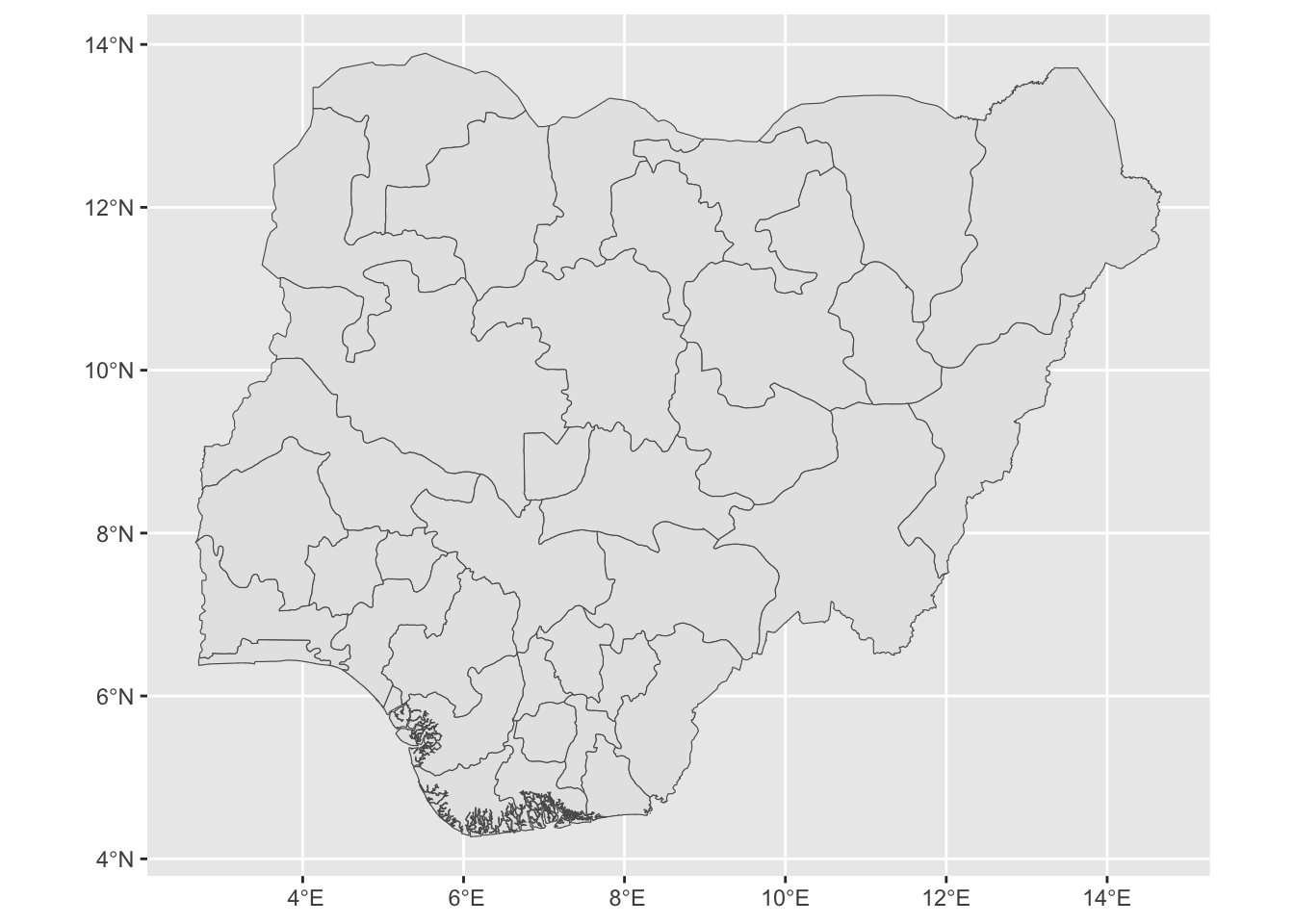
Static plot using geom_sf

Code
ggplot() +
  geom_sf(data = adm1_sf)

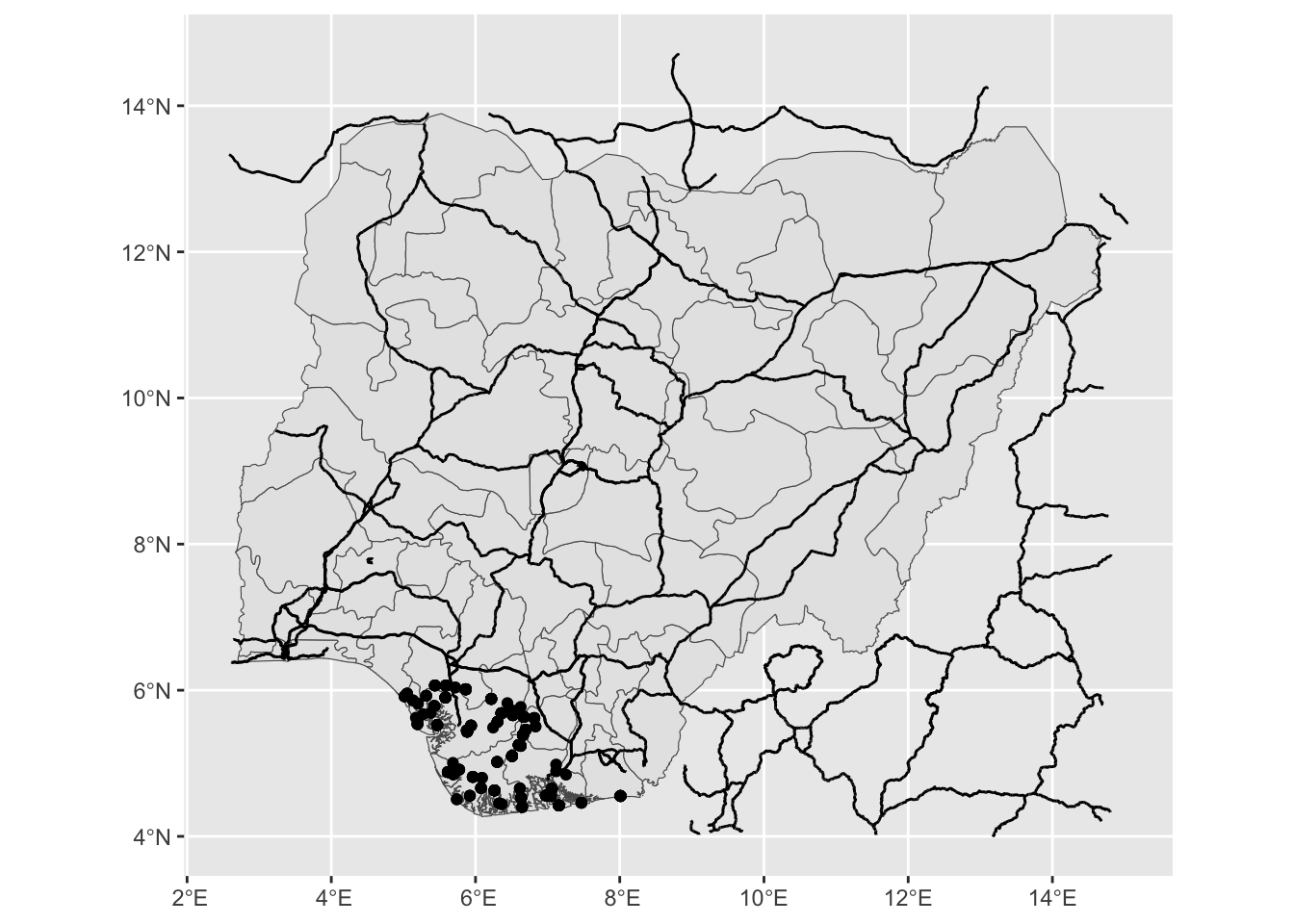
Code
roads_sf <- read_sf(here("data", "osm", "roads_nga_main.geojson"), quiet = T)

ggplot() +
  geom_sf(data = adm1_sf) +
  geom_sf(data = roads_sf) +
  geom_sf(data = gf_sf)

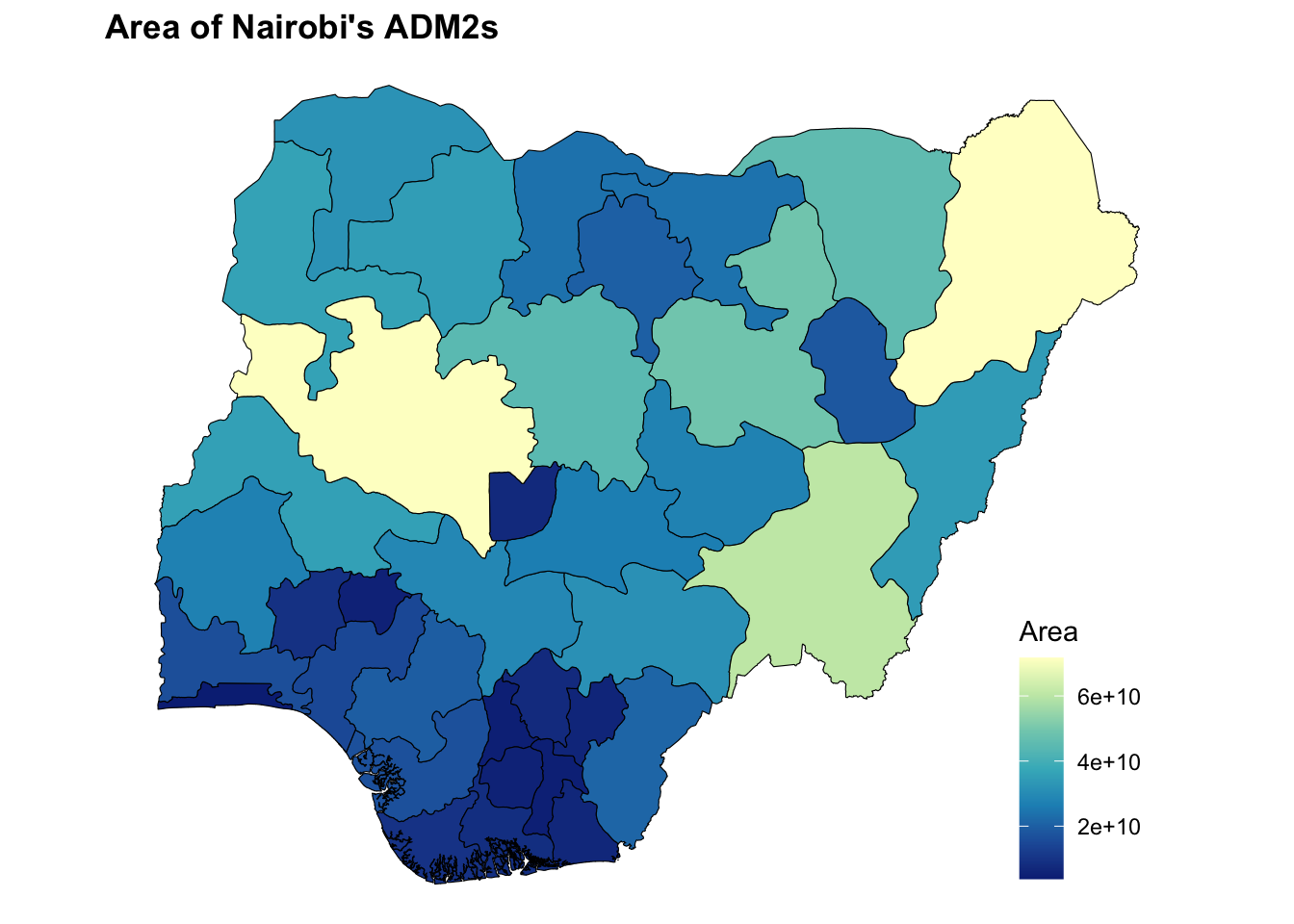
5.2 Fill by Area

Exercise

Update ggplot() + geom_sf(data = adm1_sf) to fill the polygons with "area_m2" (hint: use aes(fill = area_m2))

Code
adm1_sf <- read_sf(here("data", "gadm", "nga_adm1.geojson"), quiet = T)

adm1_sf <- adm1_sf %>%
  mutate(area_m2 = geometry %>% st_area() %>% as.numeric())

ggplot() +
  geom_sf(data = adm1_sf)

Click to see solution
Code
ggplot() +
  geom_sf(data = adm1_sf, 
          aes(fill = area_m2),
          color = "black") +
  scale_fill_distiller(palette = "YlGnBu", 
                       direction = -1) + 
  labs(fill = "Area",
       title = "Area of Nairobi's ADM2s") +
  theme_void() +
  theme(legend.position = c(0.9, 0.2),
        plot.title = element_text(face = "bold"))

5.3 Interactive Maps

We use the leaflet package to make interactive maps. Leaflet is a JavaScript library, but the leaflet R package allows making interactive maps using R. Use of leaflet somewhat mimics how we use ggplot.

  • Start with leaflet() (instead of ggplot())
  • Add spatial layers, defining type of layer (similar to geometries)
Note: We can spent lots of time going over what we can done with leaflet - but that would take up too much time. This resource provides helpful tutorials for things like:
  • Changing the basemap
  • Adding colors
  • Adding a legend
  • And much more!

Basic Map

Code
leaflet() %>%
  addTiles() %>% # Basemap
  addPolygons(data = adm1_sf)

Color polygons by variable

Code
adm1_sf <- adm1_sf %>%
  mutate(area_m2 = geometry %>% st_area() %>% as.numeric()) 

# Create a palette function
pal <- colorNumeric(
  palette = "YlGnBu",    # choose a palette name or vector of colors
  domain = adm1_sf$area_m2 # numeric values to map
)

leaflet() %>%
  addTiles() %>% # Basemap
  addPolygons(data = adm1_sf,
              fillColor = ~pal(area_m2),
              fillOpacity = 0.8) %>%
  addLegend(
    pal = pal,
    values = adm1_sf$area_m2,
    title = "Area (m²)"
  )

5.4 Interactive map with multiple layers

Exercise

Make an interactive map with that shows:

  1. ADM2 polygons (adm1_sf)
  2. Trunk roads (roads_sf, but where highway is trunk)
  3. Gas flare locations (gf_sf)

Hint: Use all three of: addPolygons(), addPolylines(), and addCirlces()

Code
roads_sf <- read_sf(here("data", "osm", "roads_nga_main.geojson"), quiet = T)
adm1_sf  <- read_sf(here("data", "gadm", "nga_adm1.geojson"), quiet = T)
gf_df   <- read_csv(here("data", "gas_flaring", "finaldata", "gas_flaring_nga.csv"),
                    show_col_types = F)

#### Spatiall define Gas Flaring
gf_sf <- gf_df %>%
  st_as_sf(coords = c("longitude", "latitude"),
           crs = 4326)
Click to see solution
Code
roads_sf <- read_sf(here("data", "osm", "roads_nga_main.geojson"), quiet = T)
adm1_sf  <- read_sf(here("data", "gadm", "nga_adm1.geojson"), quiet = T)
gf_df   <- read_csv(here("data", "gas_flaring", "finaldata", "gas_flaring_nga.csv"),
                    show_col_types = F)

#### Spatiall define Gas Flaring
gf_sf <- gf_df %>%
  st_as_sf(coords = c("longitude", "latitude"),
           crs = 4326)

#### Filter roads to trunk roads
trunk_sf <- roads_sf %>%
  filter(highway == "trunk")

#### Map
leaflet() %>%
  addTiles() %>% 
  addPolygons(data = adm1_sf, fillOpacity = 0.1) %>%
  addPolylines(data = roads_sf, color = "black") %>%
  addCircles(data = gf_sf, color = "red")

6 Vector Data: Spatial Operations on 1 Dataset

  • st_buffer(): Buffer point/line/polygon
  • st_union(): Dissolve by attribute (resolving boundaries)
  • st_combine(): Dissolve by attribute (without resolving boundaries). Faster than st_union(), but can lead to issues.
  • st_transform(): Transform CRS
  • st_centroid(): Create new sf object that uses the centroid
  • st_drop_geometry(): Drop geometry; convert from sf to dataframe
  • st_bbox(): Get bounding box
  • st_make_valid(): Makes a valid sf object (eg, deals with overlapping geometries)

6.1 Buffer

Code
gf_5km_sf <- gf_sf %>% st_buffer(dist = 5000)

ggplot() +
  geom_sf(data = gf_5km_sf)

6.2 Combine/Union

Code
adm2_sf <- read_sf(here("data", "gadm", "nga_adm2.geojson"), quiet = T)

adm1_combine_sf <- adm2_sf %>% 
  group_by(NAME_1) %>%
  summarise(geometry = st_combine(geometry)) %>%
  ungroup()

adm1_union_sf <- adm2_sf %>% 
  group_by(NAME_1) %>%
  summarise(geometry = st_union(geometry)) %>%
  ungroup()

print(paste("N Rows adm1_combine_sf: ", nrow(adm1_combine_sf), "; N Rows adm1_union_sf: ", nrow(adm1_union_sf)))
[1] "N Rows adm1_combine_sf:  37 ; N Rows adm1_union_sf:  37"
Code
ggplot() +
  geom_sf(data = adm1_combine_sf, aes(color = "Using: st_combine()"), fill = NA) +
  geom_sf(data = adm1_union_sf, aes(color = "Using: st_union()"), fill = NA)

6.3 Other functions

Exercise: Run code and check outputs. How do they differ from adm2_sf?

Code
adm2_sf <- read_sf(here("data", "gadm", "nga_adm2.geojson"), quiet = T)

adm2_proj_sf  <- adm2_sf %>% st_transform(crs = 2311)
adm2_point_sf <- adm2_sf %>% st_centroid()
Warning: st_centroid assumes attributes are constant over geometries
Code
adm2_df       <- adm2_sf %>% st_drop_geometry()
adm2_bbox     <- adm2_sf %>% st_bbox()

7 Vector Data: Spatial Operations on 2+ Datasets

  • st_intersects(): Indicates whether simple features intersect (returns TRUE/FALSE).
  • st_intersection(): Cut one spatial object based on another (returns spatial object).
  • st_difference(): Remove part of spatial object based on another.
  • st_distance(): Calculate distances.
  • st_join(): Spatial join (ie, add attributes of one dataframe to another based on location).

7.1 Intersects

Code
roads_sf <- read_sf(here("data", "osm", "roads_nga_main.geojson"), quiet = T)

# Matrix of T/F. apply(1, max) shows if adm1_sf intersects with any major roads
st_intersects(adm1_sf, roads_sf, sparse = F) %>% apply(1, max)
 [1] 1 1 1 1 1 0 1 1 1 1 1 1 0 1 1 1 1 1 1 1 1 1 1 1 1 1 1 1 1 1 1 1 1 1 1 1 1

7.2 Intersection

Code
delta_sf <- adm1_sf %>% filter(NAME_1 == "Delta")
gf_delta_sf <- st_intersection(gf_sf, delta_sf)
Warning: attribute variables are assumed to be spatially constant throughout
all geometries
Code
ggplot() +
  geom_sf(data = delta_sf, color = "red") +
  geom_sf(data = gf_delta_sf)

7.3 Difference

Code
gf_notdelta_sf <- st_difference(gf_sf, delta_sf)
Warning: attribute variables are assumed to be spatially constant throughout
all geometries
Code
ggplot() +
  geom_sf(data = delta_sf, color = "red") +
  geom_sf(data = gf_notdelta_sf)

7.4 Other Functions

Code
#### Load Data
adm1_sf <- read_sf(here("data", "gadm", "nga_adm1.geojson"), quiet = T)
gf_df   <- read_csv(here("data", "gas_flaring", "finaldata", "gas_flaring_nga.csv"),
                    show_col_types = F)

gf_sf <- gf_df %>%
  st_as_sf(coords = c("longitude", "latitude"),
           crs = 4326)

#### Add attributes from adm1_sf to gf_sf
gf_adminfo_sf     <- st_join(gf_sf, adm1_sf)

#### Calculate distance from adm1_sf to nearest gas flare location
adm1_sf$dist_gf_m <- st_distance(adm1_sf, gf_sf) %>% apply(1, min)

7.5 Exercise

Exercise: Remove gas flaring locations from adm0_sf

  • Use st_difference()
  • Make a map of adm0_sf without gas flares to see output
Code
#### Load data

adm0_sf <- read_sf(here("data", "gadm", "nga_adm0.geojson"), quiet = T)
gf_df   <- read_csv(here("data", "gas_flaring", "finaldata", "gas_flaring_nga.csv"),
                    show_col_types = F)

#### Spatially define gas flaring
gf_sf <- gf_df %>%
  st_as_sf(coords = c("longitude", "latitude"),
           crs = 4326)

#### Buffer Gas Flares
gf_buff_sf <- gf_sf %>% st_buffer(dist = DISTANCE) # [CHOOSE DISTANCE HERE!!!]

#### Union
# Using st_difference works easier if collapse gas flares to one row
gf_union_sf <- gf_sf %>%
  st_union() %>% # Make 1 row
  st_as_sf() # Make feature collection

#### Remove gas flares from adm2_sf
# [CODE HERE]

#### Map
Click to see solution
Code
#### Load data
adm0_sf <- read_sf(here("data", "gadm", "nga_adm0.geojson"), quiet = T)
gf_df   <- read_csv(here("data", "gas_flaring", "finaldata", "gas_flaring_nga.csv"),
                    show_col_types = F)

#### Spatially define gas flaring
gf_sf <- gf_df %>%
  st_as_sf(coords = c("longitude", "latitude"),
           crs = 4326)

#### Buffer
gf_5km_sf <- gf_sf %>% st_buffer(dist = 5000)

#### Union
# Using st_difference works easier if collapse gas flares to one row
gf_5km_union_sf <- gf_5km_sf %>%
  st_union() %>% # Make 1 row
  st_as_sf() %>% # Make feature collection
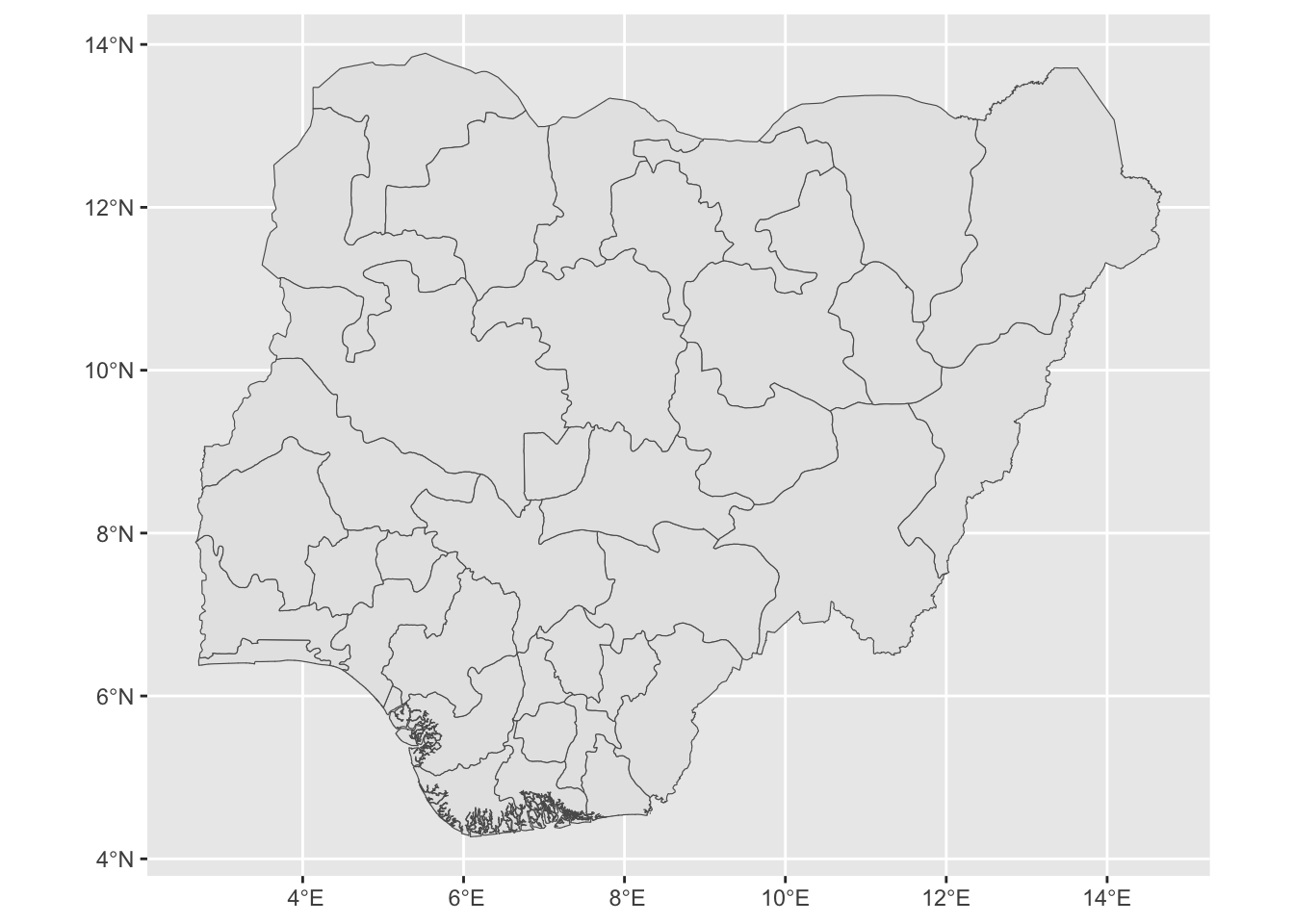
  st_make_valid()
  
#### Remove gas flares from adm2_sf
adm0_nofg_sf <- st_difference(adm0_sf, gf_5km_union_sf)
Warning: attribute variables are assumed to be spatially constant throughout
all geometries
Code
#### Map
leaflet() %>%
  addTiles() %>%
  addPolygons(data = adm0_nofg_sf) 

8 Raster Data

Summary of Functions

  • Select functions from terra package
    • rast(): Load file (eg, .tif file)
    • crop(r, polygon_sf): Restrict raster to bounding box of polygon
    • mask(r, polygon_sf): Set values to NA outside of polygon
    • mask(r, polygon_sf, inverse = T): Set values to NA inside of polygon
  • Zonal Statistics
    • extract(r, polygon_sf, "sum"): Zonal stats using terra package
    • exact_extract(r, polygon_sf, "sum"): Zonal stats using exact_extractr package (can be faster)
  • Mapping
    • plot(): Basic raster plot
    • ggplot() + geom_spatraster(): Static map
    • leaflet() %>% addTiles() %>% addRasterImage(ntl_log_r): Interactive map

1 Band

Code
ntl_r <- rast(file.path(here("data", "ntl_blackmarble", "nigeria",
                             "VNP46A4_NearNadir_Composite_Snow_Free_qflag_t2024.tif")))

ntl_r
class       : SpatRaster 
size        : 2309, 2882, 1  (nrow, ncol, nlyr)
resolution  : 0.004166667, 0.004166667  (x, y)
extent      : 2.666667, 14.675, 4.270833, 13.89167  (xmin, xmax, ymin, ymax)
coord. ref. : lon/lat WGS 84 (EPSG:4326) 
source      : VNP46A4_NearNadir_Composite_Snow_Free_qflag_t2024.tif 
name        :    t2024 
min value   :    0.000 
max value   : 7250.133 

Multiple bands in individual tif

Code
ntl_m_r <- rast(file.path(here("data", "ntl_blackmarble", "nigeria",
                               "VNP46A4_all.tif")))

ntl_m_r
class       : SpatRaster 
size        : 2309, 2882, 12  (nrow, ncol, nlyr)
resolution  : 0.004166667, 0.004166667  (x, y)
extent      : 2.666667, 14.675, 4.270833, 13.89167  (xmin, xmax, ymin, ymax)
coord. ref. : lon/lat WGS 84 (EPSG:4326) 
source      : VNP46A4_all.tif 
names       :    t2012,    t2013,    t2014,    t2015,    t2016,    t2017, ... 
min values  :     0.00,    0.000,    0.000,     0.00,    0.000,    0.000, ... 
max values  : 17658.02, 9301.502, 8211.719, 14112.49, 9205.006, 8250.558, ... 

Multiple bands Load multiple bands from multiple tif files

Code
ntl_m_r <- file.path(here("data", "ntl_blackmarble", "nigeria")) %>%
  list.files(full.names = T,
             pattern = "*.tif") %>%
  str_subset("VNP46A4") %>% # Annual files
  str_subset("20") %>% # Individual annual files (2012, 2013, etc)
  rast()

ntl_m_r
class       : SpatRaster 
size        : 2309, 2882, 13  (nrow, ncol, nlyr)
resolution  : 0.004166667, 0.004166667  (x, y)
extent      : 2.666667, 14.675, 4.270833, 13.89167  (xmin, xmax, ymin, ymax)
coord. ref. : lon/lat WGS 84 (EPSG:4326) 
sources     : VNP46A4_NearNadir_Composite_Snow_Free_qflag_t2012.tif  
              VNP46A4_NearNadir_Composite_Snow_Free_qflag_t2013.tif  
              VNP46A4_NearNadir_Composite_Snow_Free_qflag_t2014.tif  
              ... and 10 more sources
names       :    t2012,    t2013,    t2014,    t2015,    t2016,    t2017, ... 
min values  :     0.00,    0.000,    0.000,     0.00,    0.000,    0.000, ... 
max values  : 17658.02, 9301.502, 8211.719, 14112.49, 9205.006, 8250.558, ... 
Code
ntl_m_r[[1]]
class       : SpatRaster 
size        : 2309, 2882, 1  (nrow, ncol, nlyr)
resolution  : 0.004166667, 0.004166667  (x, y)
extent      : 2.666667, 14.675, 4.270833, 13.89167  (xmin, xmax, ymin, ymax)
coord. ref. : lon/lat WGS 84 (EPSG:4326) 
source      : VNP46A4_NearNadir_Composite_Snow_Free_qflag_t2012.tif 
name        :    t2012 
min value   :     0.00 
max value   : 17658.02 

8.1 Raster Algebrea

Code
ntl_p1_r   <- ntl_r + 1            # Add
ntl_t5_r   <- ntl_r * 5            # Multiply
ntl_bin_r  <- ntl_r >= 10          # Make binary

ntl_log_r  <- log(ntl_r)           # Log
ntl_log_r[ntl_log_r == -Inf] <- NA # Replace values (Log of 0 is -Inf)

ntl_m_log_r  <- log(ntl_m_r)           # Log
ntl_m_log_r[ntl_m_log_r == -Inf] <- NA # Replace values (Log of 0 is -Inf)

ntl_mean_r <- (ntl_m_r[[1]] + ntl_m_r[[2]])/2 # Add and divide

8.2 Static Maps

Simple Plot

Code
ntl_log_r  <- log(ntl_r)           
ntl_log_r[ntl_log_r == -Inf] <- NA 

plot(ntl_log_r)

Simple Plot

Code
ntl_m_log_r  <- log(ntl_m_r)           # Log
ntl_m_log_r[ntl_m_log_r == -Inf] <- NA # Replace values (Log of 0 is -Inf)

plot(ntl_m_log_r)

Using ggplot

We use ggplot and the tidyterra package, which brings geom_spatraster for plotting rasters

Code
ggplot() +
  geom_spatraster(data = ntl_r) +
  scale_fill_distiller(palette = "YlOrRd",
                       na.value = "black",
                       trans = "log" ) +
  labs(fill = "Radiance") +
  theme_void()
<SpatRaster> resampled to 500070 cells.
Warning in scale_fill_distiller(palette = "YlOrRd", na.value = "black", :
log-2.718282 transformation introduced infinite values.

8.3 Interactive Maps

In leaflet(), we can use addRasterImage() to plot raster files.

Code
pal <- colorNumeric("YlOrRd", values(ntl_log_r), na.color = "transparent")

leaflet() %>%
  addTiles() %>%
  addRasterImage(ntl_log_r, colors = pal, opacity = 0.8)

8.4 Cropping & Masking with Polygon

  • crop(): Restricts raster to bounding box of polygon
  • mask(): Sets values to NA that are outside of the polygon
  • mask(inverse = T): Sets values to NA that are inside of the polygon

Crop

Code
adm0_sf <- read_sf(here("data", "gadm", "nga_adm0.geojson"), quiet = T)
ntl_r <- rast(file.path(here("data", "ntl_blackmarble", "nigeria",
                             "VNP46A4_NearNadir_Composite_Snow_Free_qflag_t2024.tif")))

ntl_crop_r <- crop(ntl_r, adm0_sf)

plot(log(ntl_crop_r+1))

Mask

Code
adm0_sf <- read_sf(here("data", "gadm", "nga_adm0.geojson"), quiet = T)
ntl_r <- rast(file.path(here("data", "ntl_blackmarble", "nigeria",
                             "VNP46A4_NearNadir_Composite_Snow_Free_qflag_t2024.tif")))

ntl_mask_r <- mask(ntl_r, adm0_sf)

plot(log(ntl_mask_r+1))

Mask, Inverse

Code
adm0_sf <- read_sf(here("data", "gadm", "nga_adm0.geojson"), quiet = T)
ntl_r <- rast(file.path(here("data", "ntl_blackmarble", "nigeria",
                             "VNP46A4_NearNadir_Composite_Snow_Free_qflag_t2024.tif")))

ntl_mask_inv_r <- mask(ntl_r, adm0_sf, inverse = T)

plot(log(ntl_mask_inv_r+1))

8.5 Zonal Statistics

Zonal statistics refers to calculating statistics of raster data within a zone (ie, polygons)

Using terra::extract

Code
adm1_sf$ntl_v1 <- terra::extract(ntl_r, adm1_sf, fun = "sum")$t2024 

Using exactextractr::exact_extract

Code
adm1_sf$ntl_v2 <- exact_extract(ntl_r, adm1_sf, fun = "sum", progress = F)

head(adm1_sf)
Simple feature collection with 6 features and 4 fields
Geometry type: MULTIPOLYGON
Dimension:     XY
Bounding box:  xmin: 5.376527 ymin: 4.270418 xmax: 13.72793 ymax: 12.5025
Geodetic CRS:  WGS 84
# A tibble: 6 × 5
  NAME_1                                        geometry dist_gf_m ntl_v1 ntl_v2
  <chr>                               <MULTIPOLYGON [°]>     <dbl>  <dbl>  <dbl>
1 Abia      (((7.462832 4.98177, 7.462608 4.967931, 7.4…     2554. 10014.  9783.
2 Adamawa   (((12.25072 8.172622, 12.24873 8.170198, 12…   533453.  3249.  3248.
3 Akwa Ibom (((8.319584 4.557639, 8.319584 4.557917, 8.…        0  25583. 25489.
4 Anambra   (((6.935766 5.857954, 6.93626 5.84572, 6.93…     1413. 27386. 27387.
5 Bauchi    (((9.752657 9.600874, 9.735358 9.567298, 9.…   515848.  3523.  3524.
6 Bayelsa   (((6.096529 4.355138, 6.096529 4.354584, 6.…        0  51463. 50830.

Multiple stats

Code
ntl_stat_df <- exact_extract(ntl_r, adm1_sf, 
                             fun = c("sum",
                                     "max",
                                     "quantile"), 
                             quantiles = c(0.05, 0.95),
                             progress = F)

head(ntl_stat_df)
        sum        max        q05       q95
1  9782.731  858.18555 0.03061289 1.7646794
2  3248.170   17.33784 0.02526311 0.4799990
3 25489.318 1353.56470 0.03054584 1.7820940
4 27386.633 2380.75830 0.04162901 3.1691380
5  3524.488   22.07132 0.02517631 0.4783499
6 50829.910 1728.58252 0.01286371 2.1828228

Raster stack

Code
ntl_m_df <- exact_extract(ntl_m_r, adm1_sf, fun = "sum", progress = F)

head(ntl_m_df)
   sum.t2012 sum.t2013  sum.t2014 sum.t2015 sum.t2016 sum.t2017  sum.t2018
1  10189.966  7155.173  7505.5913  8165.075  6416.716  4410.293   5045.316
2   1115.701  1046.350   962.9081  1763.057  2053.528  2698.011   3449.281
3  31580.150 44040.727 46432.4844 56220.180 47237.406 37922.934  37650.859
4   8594.881  9580.131  8324.4014  8081.788  6862.842  8069.170   8306.239
5   2761.556  3029.873  3186.5972  2957.411  2371.528  1651.934   1854.828
6 103600.742 75776.820 64192.8242 77446.281 79291.305 89185.422 122521.117
   sum.t2019  sum.t2020 sum.t2021 sum.t2022 sum.t2023 sum.t2024
1   5314.530   3993.855  5587.842  5232.054  8238.083  9782.731
2   3396.985   3343.979  3822.410  4972.607  4614.445  3248.170
3  27689.256  20784.520 25177.658 25873.525 29289.043 25489.318
4  10843.692  13167.636 12807.396 15874.835 22875.186 27386.633
5   1690.922   2149.595  3007.172  4236.578  3735.690  3524.488
6 106066.258 104168.242 79706.742 46287.004 36768.777 50829.910

Custom functions

exact_extract() allows using custom functions for creating stats out of satellite imagery. For the fun argument in exact_extract(), we enter a function with two arguments:

  • values: Nighttime light values
  • coverage_fraction: Fraction of pixel that overlaps with polygon

Below, we return the number of pixels in polygons that are above 1 (weighting by the coverage fraction). sum(values_g1 * coverage_fraction, na.rm = TRUE) returns a vector, so exact_extract will return a vector.

Code
adm1_sf$n_ntl_g1 <- exact_extract(ntl_r, 
                                  adm1_sf, 
                                  fun = function(values, coverage_fraction) {
                                    values_g1 <- values >= 1
                                    sum(values_g1 * coverage_fraction, na.rm = TRUE)
                                  }, 
                                  progress = F)

We can also change the function to return a dataframe

Code
ntl_df <- exact_extract(ntl_r, 
                        adm1_sf, 
                        fun = function(values, coverage_fraction) {
                          
                          n_g1 <- sum( (values >= 1) * coverage_fraction, na.rm = TRUE)
                          n_g5 <- sum( (values >= 5) * coverage_fraction, na.rm = TRUE)
                          n_g10 <- sum( (values >= 10) * coverage_fraction, na.rm = TRUE)
                          
                          data.frame(n_g1 = n_g1,
                                     n_g5 = n_g5,
                                     n_g10 = n_g10)
                        }, 
                        progress = F)

head(ntl_df)
      n_g1     n_g5     n_g10
1 1839.149 182.8927  48.14094
2  913.000 159.0000   8.00000
3 2841.058 491.0875 182.20742
4 4471.864 572.1649 187.43337
5  897.556 198.0000  22.00000
6 5102.413 952.3233 475.98518

Exercise: Make a map of the sum of NTL at the ADM 2 level

Code
#### Load data
adm2_sf <- read_sf(here("data", "gadm", "nga_adm2.geojson"), quiet = T)
ntl_r <- rast(file.path(here("data", "ntl_blackmarble", "nigeria",
                             "VNP46A4_NearNadir_Composite_Snow_Free_qflag_t2024.tif")))

#### Extract Sum of NTL

#### Map
Click to see solution
Code
#### Load data
adm2_sf <- read_sf(here("data", "gadm", "nga_adm2.geojson"), quiet = T)
ntl_r <- rast(file.path(here("data", "ntl_blackmarble", "nigeria",
                             "VNP46A4_NearNadir_Composite_Snow_Free_qflag_t2024.tif")))

#### Extract Sum of NTL
adm2_sf$ntl_sum <- exact_extract(ntl_r, adm2_sf, fun = "sum", progress = F)

#### Map
ggplot() +
  geom_sf(data = adm2_sf,
          aes(fill = log(ntl_sum+1)),
          color = NA) +
  labs(fill = "Log Radiance") +
  scale_fill_viridis_c(option = "magma") +
  theme_void()

9 BlackMarbleR: Overview

9.1 BlackMarble

Black Marble Products

The BlackMarbleR package facilitates retrieving and working with nighttime lights data from NASA Black Marble. Black Marble produces a number of nighttime light products, from daily, monthly, to annual composites.

Why BlackMarbleR?

The above image notes that produces are available via the NASA LAADS Archive. Within the archive, raw nighttime lights data are separated by (1) time and (2) tile. The below image shows a screenshot from the archive—showing raw files for January 2024.

In some cases, our region of interest to examine nighttime lights crosses multiple tiles. For example, 4 tiles comprise Nigeria Consequently, to examine annual trends in nighttime lights for Kenya, for each year we’d need to download 4 tiles and mosaic them together. Doing this manually can be time consuming. The BlackMarbleR package does this all for us.

9.2 BlackMarble R Package - BlackMarbleR

The documentation for BlackMarbleR contains more extended documentation. This section provides a brief overview of functions and key inputs.

Functions

The blackmarbler package contains two main functions:

  • bm_raster For retrieving rasters of nighttime lights for a given region of interest
  • bm_extract For retrieving zonal statistics (sum, mean, etc) of nighttime lights for a given region of interest.

Required arguments

Below are the main, required arguments to the functions:

  • roi_sf: sf object defining region of interest (sf polygon)
  • product_id: Black Marble product ID
    • "VNP46A1": Daily (raw)
    • "VNP46A2": Daily (corrected)
    • "VNP46A3": Monthly
    • "VNP46A4": Annual
  • date: Date to query (can be one or multiple dates).
  • bearer: NASA bearer token. For instructions on how to create a token, see here.

Additional arguments

Below are select optional arguments; for all arguments, see documentation here.

  • variable: The variable to use for nighttime lights. For monthly and annual data (VNP46A3 and VNP46A4) the default is "NearNadir_Composite_Snow_Free".
  • quality_flag_rm: Quality flag used to set values to NA. For examples using the quality variable, see here.
  • output_location_type: Either "r_memory" or "file".
    • "r_memory": Data is only load into R memory.
    • "file": File (raster or dataframe) is saved locally; data is also load into R memory.
  • file_dir: When output_location_type = "file", the directory where to save the data.
  • aggregation_fun: For bm_extract, a vector of functions to aggregate data (default: "mean").

9.3 Usage

bm_raster()

Code
# Load ADM
adm0_sf <- read_sf(here("data", "gadm", "nga_adm0.geojson"), quiet = T)

# Raster, where gap filled removed
ntl_r <- bm_raster(
  roi_sf = adm0_sf,
  product_id = "VNP46A3",
  date = "2024-01-01",
  bearer = "dont-change",
  output_location_type = "file",
  file_dir = file.path(here("data", "ntl_blackmarble", "nigeria"))
)

plot(log(ntl_r+1))

bm_extract()

Code
# Load ADM
adm1_sf <- read_sf(here("data", "gadm", "nga_adm1.geojson"), quiet = T)

# Raster, where gap filled removed
ntl_df <- bm_extract(
  roi_sf = adm1_sf,
  product_id = "VNP46A4",
  date = 2012:2024,
  bearer = "dont-change",
  output_location_type = "file",
  file_dir = file.path(here("data", "ntl_blackmarble", "nigeria", "adm1")),
  aggregation_fun = "sum"
)

head(ntl_df)
     NAME_1    ntl_sum n_pixels n_non_na_pixels prop_non_na_pixels date
1      Abia  10189.966    22817           22817                  1 2012
2   Adamawa   1115.701   164368          164368                  1 2012
3 Akwa Ibom  31580.150    32227           32227                  1 2012
4   Anambra   8594.881    22128           22128                  1 2012
5    Bauchi   2761.556   235546          235546                  1 2012
6   Bayelsa 103600.742    48000           48000                  1 2012

9.4 Exercise 1

Exercise: Use bm_raster to extract a raster of the quality of NTL for January 2024 (monthly data)

  • The quality variable is: NearNadir_Composite_Snow_Free_Quality
  • After extracting the data plot, it.
  • What do the different quality numbers mean?
Code
# Load ADM
adm0_sf <- read_sf(here("data", "gadm", "nga_adm0.geojson"), quiet = T)

# Raster, where gap filled removed
ntl_r <- bm_raster(
  roi_sf = adm0_sf,
  product_id = "VNP46A3",
  date = "2024-01-01",
  bearer = bearer,
  output_location_type = "file",
  variable = "", # SET THIS TO SOMETHING !!!!!
  file_dir = file.path(here("data", "ntl_blackmarble", "nigeria")),
)

# Plot
Click to see solution
Code
# Load ADM
adm0_sf <- read_sf(here("data", "gadm", "nga_adm0.geojson"), quiet = T)

# Raster, where gap filled removed
ntl_r <- bm_raster(
  roi_sf = adm0_sf,
  product_id = "VNP46A3",
  date = "2024-01-01",
  bearer = "dont-change",
  output_location_type = "file",
  variable = "NearNadir_Composite_Snow_Free_Quality",
  file_dir = file.path(here("data", "ntl_blackmarble", "nigeria"))
)

# Plot
plot(ntl_r)

9.5 Exercise 2

Exercise: Use bm_raster to extract a raster of NTL for 2022, 2023, and 2024. Create a plot that shows the log of average nighttime lights across those three years (at the pixel level)

Code
# Load ADM
adm0_sf <- read_sf(here("data", "gadm", "nga_adm0.geojson"), quiet = T)

# Raster, where gap filled removed
ntl_r <- bm_raster(
  roi_sf = adm0_sf,
  product_id = # CHANGE TO SOMETHING!!!!!,
  date = # CHANGE TO SOMETHING!!!!!,
  bearer = "dont-change",
  output_location_type = "file",
  file_dir = file.path(here("data", "ntl_blackmarble", "nigeria"))
)

# Make average & log

# Plot
Error in parse(text = input): <text>:9:8: unexpected '='
8:   product_id = # CHANGE TO SOMETHING!!!!!,
9:   date =
          ^
Click to see solution
Code
# Load ADM
adm0_sf <- read_sf(here("data", "gadm", "nga_adm0.geojson"), quiet = T)

# Raster, where gap filled removed
ntl_r <- bm_raster(
  roi_sf = adm0_sf,
  product_id = "VNP46A4",
  date = 2022:2024,
  bearer = "dont-change",
  output_location_type = "file",
  file_dir = file.path(here("data", "ntl_blackmarble", "nigeria"))
)
"/Users/ssarva/ntl-training-1/data/ntl_blackmarble/nigeria/VNP46A4_NearNadir_Composite_Snow_Free_qflag_t2022.tif" already exists; skipping.
"/Users/ssarva/ntl-training-1/data/ntl_blackmarble/nigeria/VNP46A4_NearNadir_Composite_Snow_Free_qflag_t2023.tif" already exists; skipping.
"/Users/ssarva/ntl-training-1/data/ntl_blackmarble/nigeria/VNP46A4_NearNadir_Composite_Snow_Free_qflag_t2024.tif" already exists; skipping.
Code
# Make average & log
ntl_avg_r <- mean(ntl_r)
ntl_avg_log_r <- log(ntl_avg_r)

# Plot
ggplot() +
  geom_spatraster(data = ntl_avg_log_r) +
  scale_fill_viridis_c(na.value = "white") +
  theme_minimal()
<SpatRaster> resampled to 500070 cells.

10 BlackMarbleR: Exercise 1 [Gas Flaring in Nigeria]

This exercise involves examining NTL in and outside of gas flare locations in Nigeria. There are two parts:

1. Calculate NTL at ADM2 level (including and excluding gas flares)

2. Calculate NTL within each gas flare location

10.1 Part 1: Nighttime lights at ADM2 level

Determine the sum of nighttime lights annually from 2012 to 2024 across Nigeria (ie, at ADM0 level). Make a figure that shows trends in NTL:

  • Across Nigeria
  • Across Nigeria - only considering gas flaring locations
  • Across Nigeria - excluding gas flaring locations

Decisions to make

  • What buffer should you use for excluding gas flaring locations?
  • How to include/exclude gas flaring locations?
  • Approach 1: Mask NTL raster (ie, use mask() and mask(inverse = T))
  • Approach 2: Create geometries including/excluding gas flaring (ie, use st_intersection() and st_difference())
Code
#### Load data
nga0_sf <- read_sf(here("data", "gadm", "nga_adm0.geojson"))
gf_df   <- read_csv(here("data", "gas_flaring", "finaldata", "gas_flaring_nga.csv"),
                    show_col_types = F)

#### Buffer gas flaring
gf_sf <- gf_df %>%
  st_as_sf(coords = c("longitude", "latitude"),
           crs = 4326)

gf_5km_sf <- st_buffer(gf_sf, dist = 5000)

#### Get NTL rasters
ntl_r <- bm_raster(
  roi_sf = nga0_sf,
  product_id = "VNP46A4",
  date = 2012:2024,
  bearer = "dont-change",
  output_location_type = "file",
  file_dir = file.path(here("data", "ntl_blackmarble", "nigeria"))
)

#### Make rasters or geometries that include/exclude gas flaring

#### Extract NTL Data

#### Plot
Click to see solution (approach 1: masking raster)
Code
#### Load data
nga0_sf <- read_sf(here("data", "gadm", "nga_adm0.geojson"))
gf_df   <- read_csv(here("data", "gas_flaring", "finaldata", "gas_flaring_nga.csv"),
                    show_col_types = F)

#### Buffer gas flaring
gf_sf <- gf_df %>%
  st_as_sf(coords = c("longitude", "latitude"),
           crs = 4326)

gf_5km_sf <- st_buffer(gf_sf, dist = 5000)

#### Get NTL rasters
ntl_r <- bm_raster(
  roi_sf = nga0_sf,
  product_id = "VNP46A4",
  date = 2012:2024,
  bearer = "dont-change",
  output_location_type = "file",
  file_dir = file.path(here("data", "ntl_blackmarble", "nigeria"))
)

#### Mask NTL
ntl_gf_r   <- mask(ntl_r, gf_5km_sf)
ntl_nogf_r <- mask(ntl_r, gf_5km_sf, inverse = T)

#### Fix names
# Names of layers changed to "layer" for all years; exact_extract() throws
# error if all names are the same
names(ntl_nogf_r) <- paste0("t", 2012:2024)

#### Extract Data
ntl_df <- data.frame(year = 2012:2024)
ntl_df$ntl_sum      <- exact_extract(ntl_r,      nga0_sf, "sum", progress = F) %>% as.numeric()
ntl_df$ntl_gf_sum   <- exact_extract(ntl_gf_r,   nga0_sf, "sum", progress = F) %>% as.numeric()
ntl_df$ntl_nogf_sum <- exact_extract(ntl_nogf_r, nga0_sf, "sum", progress = F) %>% as.numeric()

#### Plot
ntl_df %>%
  pivot_longer(cols = -year) %>%
  mutate(name = case_when(
    name == "ntl_gf_sum" ~ "NTL: Gas Flaring",
    name == "ntl_nogf_sum" ~ "NTL: Exclude Gas Flaring",
    name == "ntl_sum" ~ "NTL: Total"
  )) %>%
  ggplot(aes(x = year,
             y = value,
             color = name)) +
  geom_line(linewidth = 1) +
  labs(x = NULL,
       y = "Radiance",
       color = NULL) +
  theme_classic()
Click to see solution (approach 2: make geometries including/excluding gas flaring)
Code
#### Load data
nga0_sf <- read_sf(here("data", "gadm", "nga_adm0.geojson"))
gf_df   <- read_csv(here("data", "gas_flaring", "finaldata", "gas_flaring_nga.csv"),
                    show_col_types = F)

#### Buffer gas flaring
gf_sf <- gf_df %>%
  st_as_sf(coords = c("longitude", "latitude"),
           crs = 4326)

gf_5km_sf <- st_buffer(gf_sf, dist = 5000)

#### Get NTL rasters
ntl_r <- bm_raster(
  roi_sf = nga0_sf,
  product_id = "VNP46A4",
  date = 2012:2024,
  bearer = "dont-change",
  output_location_type = "file",
  file_dir = file.path(here("data", "ntl_blackmarble", "nigeria"))
)
"/Users/ssarva/ntl-training-1/data/ntl_blackmarble/nigeria/VNP46A4_NearNadir_Composite_Snow_Free_qflag_t2012.tif" already exists; skipping.
"/Users/ssarva/ntl-training-1/data/ntl_blackmarble/nigeria/VNP46A4_NearNadir_Composite_Snow_Free_qflag_t2013.tif" already exists; skipping.
"/Users/ssarva/ntl-training-1/data/ntl_blackmarble/nigeria/VNP46A4_NearNadir_Composite_Snow_Free_qflag_t2014.tif" already exists; skipping.
"/Users/ssarva/ntl-training-1/data/ntl_blackmarble/nigeria/VNP46A4_NearNadir_Composite_Snow_Free_qflag_t2015.tif" already exists; skipping.
"/Users/ssarva/ntl-training-1/data/ntl_blackmarble/nigeria/VNP46A4_NearNadir_Composite_Snow_Free_qflag_t2016.tif" already exists; skipping.
"/Users/ssarva/ntl-training-1/data/ntl_blackmarble/nigeria/VNP46A4_NearNadir_Composite_Snow_Free_qflag_t2017.tif" already exists; skipping.
"/Users/ssarva/ntl-training-1/data/ntl_blackmarble/nigeria/VNP46A4_NearNadir_Composite_Snow_Free_qflag_t2018.tif" already exists; skipping.
"/Users/ssarva/ntl-training-1/data/ntl_blackmarble/nigeria/VNP46A4_NearNadir_Composite_Snow_Free_qflag_t2019.tif" already exists; skipping.
"/Users/ssarva/ntl-training-1/data/ntl_blackmarble/nigeria/VNP46A4_NearNadir_Composite_Snow_Free_qflag_t2020.tif" already exists; skipping.
"/Users/ssarva/ntl-training-1/data/ntl_blackmarble/nigeria/VNP46A4_NearNadir_Composite_Snow_Free_qflag_t2021.tif" already exists; skipping.
"/Users/ssarva/ntl-training-1/data/ntl_blackmarble/nigeria/VNP46A4_NearNadir_Composite_Snow_Free_qflag_t2022.tif" already exists; skipping.
"/Users/ssarva/ntl-training-1/data/ntl_blackmarble/nigeria/VNP46A4_NearNadir_Composite_Snow_Free_qflag_t2023.tif" already exists; skipping.
"/Users/ssarva/ntl-training-1/data/ntl_blackmarble/nigeria/VNP46A4_NearNadir_Composite_Snow_Free_qflag_t2024.tif" already exists; skipping.
Code
#### Create geometries with and excluding gas flaring
gf_5km_u_sf <- gf_5km_sf %>% 
  st_union() %>% 
  st_make_valid()

nga0_gf_sf   <- st_intersection(nga0_sf, gf_5km_u_sf)
Warning: attribute variables are assumed to be spatially constant throughout
all geometries
Code
nga0_nogf_sf <- st_difference(nga0_sf, gf_5km_u_sf)
Warning: attribute variables are assumed to be spatially constant throughout
all geometries
Code
# Returns dataframe with 2 observations; when plotting, 2nd looks correct
nga0_nogf_sf <- nga0_nogf_sf[2,]

#### Extract Data
ntl_df <- data.frame(year = 2012:2024)
ntl_df$ntl_sum      <- exact_extract(ntl_r, nga0_sf, "sum", progress = F) %>% as.numeric()
ntl_df$ntl_gf_sum   <- exact_extract(ntl_r, nga0_gf_sf, "sum", progress = F) %>% as.numeric()
ntl_df$ntl_nogf_sum <- exact_extract(ntl_r, nga0_nogf_sf, "sum", progress = F) %>% as.numeric()

#### Plot
ntl_df %>%
  pivot_longer(cols = -year) %>%
  mutate(name = case_when(
    name == "ntl_gf_sum" ~ "NTL: Gas Flaring",
    name == "ntl_nogf_sum" ~ "NTL: Exclude Gas Flaring",
    name == "ntl_sum" ~ "NTL: Total"
  )) %>%
  ggplot(aes(x = year,
             y = value,
             color = name)) +
  geom_line(linewidth = 1) +
  labs(x = NULL,
       y = "Radiance",
       color = NULL) +
  theme_classic()

10.2 Part 2: Nighttime lights in gas flaring locations

Calculate the sum of NTL around each gas flaring location in 2024. Using this data:

  1. Make a figure showing the distribution of NTL across gas flaring locations
  2. Map gas flaring locations, coloring each location by the sum of NTL
Code
#### Load data
nga0_sf <- read_sf(here("data", "gadm", "nga_adm0.geojson"))
gf_df   <- read_csv(here("data", "gas_flaring", "finaldata", "gas_flaring_nga.csv"),
                    show_col_types = F)

#### Buffer gas flaring
gf_sf <- gf_df %>%
  st_as_sf(coords = c("longitude", "latitude"),
           crs = 4326)

gf_5km_sf <- st_buffer(gf_sf, dist = 5000)

#### Get NTL rasters
ntl_r <- bm_raster(
  ###,
  bearer = "dont-change",
  output_location_type = "file",
  file_dir = file.path(here("data", "ntl_blackmarble", "nigeria"))
)

#### Extract NTL

#### Histogram

#### Map
Click to see solution
Code
#### Load data
nga0_sf <- read_sf(here("data", "gadm", "nga_adm0.geojson"))
gf_df   <- read_csv(here("data", "gas_flaring", "finaldata", "gas_flaring_nga.csv"),
                    show_col_types = F)

#### Buffer gas flaring
gf_sf <- gf_df %>%
  st_as_sf(coords = c("longitude", "latitude"),
           crs = 4326)

gf_5km_sf <- st_buffer(gf_sf, dist = 5000)

#### Get NTL rasters
ntl_r <- bm_raster(
  roi_sf = nga0_sf,
  product_id = "VNP46A4",
  date = 2024,
  bearer = "dont-change",
  output_location_type = "file",
  file_dir = file.path(here("data", "ntl_blackmarble", "nigeria"))
)

#### Extract NTL
gf_5km_sf$ntl_sum <- exact_extract(ntl_r, gf_5km_sf, "sum", progress = F)

#### Histogram
gf_5km_sf %>%
  ggplot(aes(x = ntl_sum)) +
  geom_histogram(color = "black",
                 fill = "darkorange") +
  labs(x = "Radiance",
       y = "N Gas Flaring Locations",
       title = "Distribution of NTL across gas flaring locations") +
  theme_classic()

#### Map
ggplot() +
  geom_sf(data = gf_5km_sf,
          aes(fill = ntl_sum)) +
  theme_void()

11 BlackMarbleR: Exercise 2 [Hurricane Maria]

On September 20, 2017, Hurricane Maria—then a category 4 hurricane—struck Puerto Rico, killing an estimate 3,000 people and leaving significant damage. In this exercise, we’ll use nighttime lights to understand earthquake damages & recovery. This exercise has four parts.

  1. Calculate monthly trends in NTL before and after the hurricane
  2. Create a map at the ADM1 level showing changes in NTL before and after the hurricane
  3. Create a map at the pixel level showing changes in NTL before and after the hurricane
  4. Assess whether we can use daily data to understand the immediate damage of the hurricane. This part includes three sub-parts
  • Make rasters of variables that indicate quality
  • Check the proportion of daily rasters that are NA
  • Plot daily NTL

11.2 Part 2: Damage Assessment - ADM 1 level

Create a map that shows the percent change in nighttime lights at the ADM1 level, comparing September 2017 and October 2017.

Code
## Load Puerto Rico ADM1 polygon
pr_sf <- read_sf(here("data", "puero_rico_adm1.geojson"))

## Extract data
ntl_df <- bm_extract(
  roi_sf = #CODE HERE
  product_id = #CODE HERE
  date = #CODE HERE
  aggregation_fun = #CODE HERE
  bearer = "dont-change",
  output_location_type = "file",
  file_dir = file.path(here("data", "ntl_blackmarble", "puerto_rico", "adm1"))
)
Click to see solution
Code
pr_sf <- read_sf(here("data", "gadm", "pri_adm1.geojson"))

ntl_df <- bm_extract(
  roi_sf = pr_sf,
  product_id = "VNP46A3",
  date = seq.Date(from = ymd("2017-09-01"),
                  to = ymd("2017-10-01"),
                  by = "month"),
  aggregation_fun = "sum",
  bearer = "dont-change",
  output_location_type = "file",
  file_dir = file.path(here("data", "ntl_blackmarble", "puerto_rico", "adm1"))
)

ntl_pc_df <- ntl_df %>%
  pivot_wider(id_cols = NAME_1,
              values_from = ntl_sum,
              names_from = date) %>%
  mutate(pc = (`2017-10-01` - `2017-09-01`) / `2017-09-01` * 100)

pr_ntl_sf <- pr_sf %>%
  left_join(ntl_pc_df, by = "NAME_1")

pr_ntl_sf %>%
  ggplot() +
  geom_sf(aes(fill = pc)) +
  theme_void() +
  scale_fill_gradient(low = "red", high = "white") +
  labs(fill = "% Change",
       title = "% Change in NTL from Sept to Oct 2017")

11.3 Part 3: Damage Assessment - Pixel Level

Create a map at the pixel level that shows which pixels experienced an (1) increase (green), (2) decrease (red), or (3) no change (blue) in nighttime lights from September 2017 to October 2017.

Notes:

  1. Let’s only consider changes above a value of 1, so a pixel experienced an increase in lights if the change was above 1.
  2. Only show pixels that had some baseline level of nighttime lights. Specifically, if a pixel had a value near 0 in September and near 0 in October, the change value should be NA—we don’t classify this as “no change.”
Code
pr_sf <- read_sf(here("data", "gadm", "pri_adm0.geojson"))

ntl_r <- bm_raster(
  roi_sf = #CODE HERE
  product_id = #CODE HERE
  date = #CODE HERE
  bearer = "dont-change",
  output_location_type = "file",
  file_dir = file.path(here("data", "ntl_blackmarble", "puerto_rico"))
)
Error in parse(text = input): <text>:5:14: unexpected '='
4:   roi_sf = #CODE HERE
5:   product_id =
                ^
Click to see solution
Code
pr_sf <- read_sf(here("data", "gadm", "pri_adm0.geojson"))

ntl_r <- bm_raster(
  roi_sf = pr_sf,
  product_id = "VNP46A3",
  date = seq.Date(from = ymd("2017-09-01"),
                  to = ymd("2017-10-01"),
                  by = "month"),
  bearer = "dont-change",
  output_location_type = "file",
  file_dir = file.path(here("data", "ntl_blackmarble", "puerto_rico"))
)

ntl_08_r <- ntl_r[[1]]
ntl_09_r <- ntl_r[[2]]

ntl_pc_r <- (ntl_09_r - ntl_08_r) / ntl_08_r * 100
ntl_pc_r[ntl_pc_r >= 100]  <- 100
ntl_pc_r[ntl_pc_r <= -100] <- -100
ntl_pc_r[ntl_08_r <= 1] <- NA

pal <- colorNumeric(
  palette = "RdBu",
  domain  = values(ntl_pc_r),
  na.color = "transparent",
  reverse = TRUE   # because RdBu is red=low, blue=high by default
)

leaflet() %>%
  addTiles() %>%
  addRasterImage(
    ntl_pc_r,
    colors = pal,
    opacity = 0.5
  ) %>%
  addLegend(
    pal = pal,
    values = values(ntl_pc_r),
    title = "Radiance change (%)"
  )

11.4 Part 4: Assess Daily Data

Two daily NTL variable options include:

  1. DNB_BRDF-Corrected_NTL
  2. Gap_Filled_DNB_BRDF-Corrected_NTL

To assess quality, we can use the following variables

  1. Mandatory_Quality_Flag
  2. Latest_High_Quality_Retrieval (how far back in time a high quality retrieval was made)

11.4.1 Part 4A: Rasters of quality variables

Run the following code, which plots:

  1. DNB_BRDF-Corrected_NTL on day Hurricane hit (Sept 20)
  2. DNB_BRDF-Corrected_NTL five days after Hurricane hit (Sept 25)
  3. Gap_Filled_DNB_BRDF-Corrected_NTL five days after Hurricane hit (Sept 25)
  4. Mandatory_Quality_Flag five days after Hurricane hit (Sept 25)
  5. Latest_High_Quality_Retrieval five days after Hurricane hit (Sept 25)

What do the maps indicate about our ability to use NTL to understand the immediate impacts of Hurricane damage?

Code
pr_0_sf <- read_sf(here("data", "gadm", "pri_adm0.geojson"))

ntl_0920_r <- bm_raster(
  roi_sf = pr_0_sf,
  product_id = "VNP46A2",
  date = "2017-09-20",
  bearer = "dont-change",
  output_location_type = "file",
  variable = "DNB_BRDF-Corrected_NTL",
  file_dir = file.path(here("data", "ntl_blackmarble", "puerto_rico"))
)

ggplot() +
  geom_spatraster(data = ntl_0920_r) +
  labs(title = "DNB_BRDF-Corrected_NTL: 2017-09-20")

ntl_0925_r <- bm_raster(
  roi_sf = pr_0_sf,
  product_id = "VNP46A2",
  date = "2017-09-25",
  bearer = "dont-change",
  output_location_type = "file",
  variable = "DNB_BRDF-Corrected_NTL",
  file_dir = file.path(here("data", "ntl_blackmarble", "puerto_rico"))
)

ggplot() +
  geom_spatraster(data = ntl_0925_r) +
  labs(title = "DNB_BRDF-Corrected_NTL: 2017-09-25")

ntl_0925_gapfilled_r <- bm_raster(
  roi_sf = pr_0_sf,
  product_id = "VNP46A2",
  date = "2017-09-25",
  bearer = "dont-change",
  output_location_type = "file",
  variable = "Gap_Filled_DNB_BRDF-Corrected_NTL",
  file_dir = file.path(here("data", "ntl_blackmarble", "puerto_rico"))
)

ggplot() +
  geom_spatraster(data = ntl_0925_gapfilled_r) +
  labs(title = "Gap_Filled_DNB_BRDF-Corrected_NTL: 2017-09-25")

quality_0925_r <- bm_raster(
  roi_sf = pr_0_sf,
  product_id = "VNP46A2",
  date = "2017-09-25",
  bearer = "dont-change",
  output_location_type = "file",
  variable = "Mandatory_Quality_Flag",
  file_dir = file.path(here("data", "ntl_blackmarble", "puerto_rico"))
)

ggplot() +
  geom_spatraster(data = quality_0925_r) +
  labs(title = "Mandatory_Quality_Flag: 2017-09-25")

lastest_0925_r <- bm_raster(
  roi_sf = pr_0_sf,
  product_id = "VNP46A2",
  date = "2017-09-25",
  bearer = "dont-change",
  output_location_type = "file",
  variable = "Latest_High_Quality_Retrieval",
  file_dir = file.path(here("data", "ntl_blackmarble", "puerto_rico"))
)

ggplot() +
  geom_spatraster(data = lastest_0925_r) +
  labs(title = "Latest_High_Quality_Retrieval: 2017-09-25")

11.4.2 Part 4B: Proportion of NA pixels daily

Make a figure showing the proportion of NTL pixels that are NA across Puerto Rico daily two weeks before and after the Hurricane hit. Use the DNB_BRDF-Corrected_NTL variable.

Code
#### Load data
pr_sf <- read_sf(here("data", "gadm", "pri_adm0.geojson"))

#### Get NTL data
ntl_df <- bm_extract(
  roi_sf = pr_0_sf,
  product_id = "VNP46A2",
  date = seq.Date(from = ymd("2017-09-20") - 14,
                  to = ymd("2017-09-20") + 14,
                  by = "day"),
  bearer = "dont-change",
  output_location_type = "file",
  variable = "DNB_BRDF-Corrected_NTL",
  file_dir = file.path(here("data", "ntl_blackmarble", "puerto_rico", "adm0"))
)

#### Plot
Click to see solution
Code
#### Load data
pr_0_sf <- read_sf(here("data", "gadm", "pri_adm0.geojson"))

#### Get NTL data
ntl_df <- bm_extract(
  roi_sf = pr_0_sf,
  product_id = "VNP46A2",
  date = seq.Date(from = ymd("2017-09-20") - 14,
                  to = ymd("2017-09-20") + 14,
                  by = "day"),
  bearer = "dont-change",
  output_location_type = "file",
  variable = "DNB_BRDF-Corrected_NTL",
  file_dir = file.path(here("data", "ntl_blackmarble", "puerto_rico", "adm0"))
)

#### Plot
ntl_df %>%
  mutate(prop_na = 1 - prop_non_na_pixels) %>%
  ggplot(aes(x = date,
             y = prop_na)) +
  geom_vline(xintercept = ymd("2017-09-20")) +
  geom_line() +
  labs(x = "Date",
       y = "Proportion",
       title = "Proportion NTL Pixels in Puerto Rico NA") +
  theme_classic()
Click to see solution: More manual method, using rasters
Code
#### Load data
pr_0_sf <- read_sf(here("data", "gadm", "pri_adm0.geojson"))

#### Get rasters
ntl_r <- bm_raster(
  roi_sf = pr_0_sf,
  product_id = "VNP46A2",
  date = seq.Date(from = ymd("2017-09-20") - 14,
                  to = ymd("2017-09-20") + 14,
                  by = "day"),
  bearer = "dont-change",
  output_location_type = "file",
  variable = "DNB_BRDF-Corrected_NTL",
  file_dir = file.path(here("data", "ntl_blackmarble", "puerto_rico"))
)

#### Proportion NA
ntl_df <- exact_extract(
  ntl_r, 
  pr_sf, 
  function(values, coverage_fraction) {
    # convert coverage_fraction to weights
    w <- coverage_fraction
    
    # for each layer (column), compute proportion NA
    apply(values, 2, function(col) {
      sum(is.na(col) * w, na.rm = TRUE) / sum(w, na.rm = TRUE)
    })
  },
  progress = F
) 

#### Clean dataframe
ntl_df <- ntl_df %>%
  as.data.frame() %>%
  rownames_to_column(var = "date") %>%
  dplyr::mutate(date = date %>%
                  str_replace_all("t", "") %>%
                  ymd()) %>%
  dplyr::rename(prop_na = V1)

#### Plot
ntl_df %>%
  ggplot(aes(x = date,
             y = prop_na)) +
  geom_vline(xintercept = ymd("2017-09-20")) +
  geom_line() +
  labs(x = "Date",
       y = "Proportion",
       title = "Proportion NTL Pixels in Puerto Rico NA") +
  theme_classic()

11.4.3 Part 4C: Plot daily NTL and latest retrieval

We see there’s quality issues with DNB_BRDF-Corrected_NTL. Let’s see trends in gap filled daily data (Gap_Filled_DNB_BRDF-Corrected_NTL). For the two weeks before and after the Hurricane hit (Sept 20), plot:

  1. Daily trends in gap filled NTL (Gap_Filled_DNB_BRDF-Corrected_NTL)
  2. Average days of last retrieval for filling gap in NTL (Latest_High_Quality_Retrieval)
Code
#### Load data
pr_sf <- read_sf(here("data", "gadm", "pri_adm0.geojson"))

#### Get NTL Data
ntl_df <- bm_extract(
  roi_sf = pr_0_sf,
  product_id = "VNP46A2",
  date = seq.Date(from = ymd("2017-09-20") - 14,
                  to = ymd("2017-09-20") + 14,
                  by = "day"),
  bearer = "dont-change",
  output_location_type = "file",
  variable = "Gap_Filled_DNB_BRDF-Corrected_NTL",
  aggregation_fun = "sum",
  file_dir = file.path(here("data", "ntl_blackmarble", "puerto_rico", "adm0"))
)

#### Get Latest Retrieval Data
latest_df <- bm_extract(
  roi_sf = pr_0_sf,
  product_id = "VNP46A2",
  date = seq.Date(from = ymd("2017-09-20") - 14,
                  to = ymd("2017-09-20") + 14,
                  by = "day"),
  bearer = "dont-change",
  output_location_type = "file",
  variable = "Latest_High_Quality_Retrieval",
  aggregation_fun = "mean",
  file_dir = file.path(here("data", "ntl_blackmarble", "puerto_rico", "adm0"))
)

#### Plot
Click to see solution
Code
#### Load data
pr_sf <- read_sf(here("data", "gadm", "pri_adm0.geojson"))

#### Get NTL Data
ntl_df <- bm_extract(
  roi_sf = pr_0_sf,
  product_id = "VNP46A2",
  date = seq.Date(from = ymd("2017-09-20") - 14,
                  to = ymd("2017-09-20") + 14,
                  by = "day"),
  bearer = "dont-change",
  output_location_type = "file",
  variable = "Gap_Filled_DNB_BRDF-Corrected_NTL",
  aggregation_fun = "sum",
  file_dir = file.path(here("data", "ntl_blackmarble", "puerto_rico", "adm0"))
)

#### Get Latest Retrieval Data
latest_df <- bm_extract(
  roi_sf = pr_0_sf,
  product_id = "VNP46A2",
  date = seq.Date(from = ymd("2017-09-20") - 14,
                  to = ymd("2017-09-20") + 14,
                  by = "day"),
  bearer = "dont-change",
  output_location_type = "file",
  variable = "Latest_High_Quality_Retrieval",
  aggregation_fun = "mean",
  file_dir = file.path(here("data", "ntl_blackmarble", "puerto_rico", "adm0"))
)

#### Plot NTL
ntl_df %>%
  ggplot(aes(x = date,
             y = ntl_sum)) +
  geom_vline(xintercept = ymd("2017-09-20")) +
  geom_line() +
  labs(x = NULL,
       y = "NTL Radiance")

#### Plot NTL
latest_df %>%
  ggplot(aes(x = date,
             y = ntl_mean)) +
  geom_vline(xintercept = ymd("2017-09-20")) +
  geom_line() +
  labs(x = NULL,
       y = "Avg days since\nNTL retrieval")

12 BlackMarbleR: Exercise 3 [New Highway in Pakistan]

The Islamabad-Lahore Motorway (M-2) was upgraded, including resurfacing. We’ll use nighttime lights to understand if the road upgrades—and increased mobility from the upgrades—increased economic activity. We’ll track nighttime lights near the Islamabad-Lahore Motorway (M-2) and near another road that connects Islamabad and Lahore, the Grand Trunk Road (N-5). This exercise has three parts

  1. Make a map of NTL and roads
  2. Make a figure showing trends in NTL near the M-2 and N-5 annually
  3. Estimate a difference-in-difference estimating the impact of the M-2 on nighttime lights

12.1 Part 1: Map of NTL and Roads

Make a map that includes: 1. Nighttime lights 2. Roads, with 10km buffer

Code
#### Load data
roads_sf <- read_sf(here("data", "osm", "roads_pak_treat_n5_m2.geojson"))

# [CODE TO BUFFER ROADS HERE]

ntl_r <- bm_raster(
  roi_sf = # BUFFERED ROADS HERE,
    product_id = "VNP46A4",
  date = 2024,
  bearer = "dont-change",
  output_location_type = "file",
  file_dir = file.path(here("data", "ntl_blackmarble", "pakistan"))
)

#### MAP
# [CODE FOR MAP HERE]
Click to see solution
Code
#### Load data
roads_sf <- read_sf(here("data", "osm", "roads_pak_treat_n5_m2.geojson"))

roads_10km_sf <- roads_sf %>% st_buffer(dist = 10000)

ntl_r <- bm_raster(
  roi_sf = roads_10km_sf,
  product_id = "VNP46A4",
  date = 2024,
  bearer = "dont-change",
  output_location_type = "file",
  file_dir = file.path(here("data", "ntl_blackmarble", "pakistan"))
)

#### Map
ggplot() +
  geom_spatraster(data = ntl_r) +
  scale_fill_viridis_c(trans = "log1p",
                       option = "magma",
                       na.value = "white",
                       name = "Log NTL") +
  geom_sf(data = roads_10km_sf,
          aes(color = ref),
          linewidth = 0.5,
          fill = NA) +
  theme_void() +
  labs(color = "Road\n(10km Buffer)") +
  scale_color_manual(values = c("dodgerblue", "darkorange"))

12.3 Part 3: Diff-in-Diff Regression

Estimate a difference-in-difference regression that estimates the impact of the M-2 road upgrade on nighttime lights, relative to the N-5 road. In short, the diff-in-diff compares changes in NTL in locations near the M-2 before/after upgrades with changes in NTL in locations near the N-5. Specifically, estimate the following regression:

[ Y_{it} = i + t + {}^{2024} {t} (D_i { =t }) + _{it}, ]

The unit of analysis should be h3 hexagons (resolution 5, edge length of about 10km).

In R, this would look something like:

lm_ntl_sum  <- feols(ntl_sum ~ factor(year) * near_m2 | h3 + year, 
                     cluster = ~GID_3, data = ntl_clean_df)

where year is a factor variable for year, where the reference year is the year before upgrades. near_m2 is a binary variable that indicates if the unit is near the m2. We include fixed effects for each h3 cell and for each year, and we cluster at the ADM3 level.

Estimate regressions with the following outcome variables:

  1. Sum of NTL within hexagons
  2. Proportion of NTL > 1 within hexagons
  3. Proportion of NTL > 10 within hexagons

Hexagons should be:

  1. More than 1km from the M-2 or N-5
  2. Within 10km of the M-2 or N-5
  3. More than 5km from Islamabad and Lahore
Code
#### Load data
pak_3_sf <- read_sf(here("data", "gadm", "pak_adm3.geojson"))
roads_sf <- read_sf(here("data", "osm", "roads_pak_treat_n5_m2.geojson"))
cities_df <- read_csv(here("data", "cities", "pak_cities.csv"), show_col_types = F)

cities_sf <- cities_df %>%
  st_as_sf(coords = c("longitude", "latitude"),
           crs = 4326) 

#### Make hexagons
h3_sf <- roads_sf %>%
  st_buffer(dist = 1000) %>%
  st_bbox() %>%
  st_as_sfc() %>% # Make into polygon
  polygon_to_cells(res = 5) %>%
  cell_to_polygon(simple = FALSE)

#### Determine ADM3 that each hexagon falls in
h3_sf$GID_3 <- h3_sf %>%
  st_centroid() %>%
  st_join(pak_3_sf) %>%
  pull(GID_3)

#### Compute distance to roads and cities
h3_sf$dist_roads  <- st_distance(h3_sf, roads_sf) %>% apply(1, min)
h3_sf$dist_cities <- st_distance(h3_sf, cities_sf) %>% apply(1, min)
h3_sf$dist_m2     <- st_distance(h3_sf, roads_sf[roads_sf$ref == "M-2",]) %>% as.numeric()
h3_sf$dist_n5     <- st_distance(h3_sf, roads_sf[roads_sf$ref == "N-5",]) %>% as.numeric()

#### Get NTL
ntl_r <- bm_raster(
  roi_sf = h3_sf,
  product_id = "VNP46A4",
  date = 2012:2024,
  bearer = "dont-change",
  aggregation_fun = "sum",
  output_location_type = "file",
  file_dir = file.path(here("data", "ntl_blackmarble", "pakistan"))
)
Click to see solution
Code
#### Load data
pak_3_sf <- read_sf(here("data", "gadm", "pak_adm3.geojson"))
roads_sf <- read_sf(here("data", "osm", "roads_pak_treat_n5_m2.geojson"))
cities_df <- read_csv(here("data", "cities", "pak_cities.csv"), show_col_types = F)

cities_sf <- cities_df %>%
  st_as_sf(coords = c("longitude", "latitude"),
           crs = 4326) 

#### Make hexagons
h3_sf <- roads_sf %>%
  st_buffer(dist = 1000) %>%
  st_bbox() %>%
  st_as_sfc() %>% # Make into polygon
  polygon_to_cells(res = 5) %>%
  cell_to_polygon(simple = FALSE)

#### Determine ADM3 that each hexagon falls in
h3_sf$GID_3 <- h3_sf %>%
  st_centroid() %>%
  st_join(pak_3_sf) %>%
  pull(GID_3)

#### Compute distance to roads and cities
h3_sf$dist_roads  <- st_distance(h3_sf, roads_sf) %>% apply(1, min)
h3_sf$dist_cities <- st_distance(h3_sf, cities_sf) %>% apply(1, min)
h3_sf$dist_m2     <- st_distance(h3_sf, roads_sf[roads_sf$ref == "M-2",]) %>% as.numeric()
h3_sf$dist_n5     <- st_distance(h3_sf, roads_sf[roads_sf$ref == "N-5",]) %>% as.numeric()

#### Get NTL
ntl_r <- bm_raster(
  roi_sf = h3_sf,
  product_id = "VNP46A4",
  date = 2012:2024,
  bearer = "dont-change",
  aggregation_fun = "sum",
  output_location_type = "file",
  file_dir = file.path(here("data", "ntl_blackmarble", "pakistan"))
)

#### Transform NTL
ntl_bin1_r  <- ntl_r > 1
ntl_bin10_r <- ntl_r > 10

#### Extract NTL
ntl_df       <- exact_extract(ntl_r, h3_sf, "sum", progress = F)
ntl_bin1_df  <- exact_extract(ntl_bin1_r, h3_sf, "mean", progress = F)
ntl_bin10_df <- exact_extract(ntl_bin10_r, h3_sf, "mean", progress = F)

ntl_df$h3_address       <- h3_sf$h3_address
ntl_bin1_df$h3_address  <- h3_sf$h3_address
ntl_bin10_df$h3_address <- h3_sf$h3_address

ntl_df <- ntl_df %>%
  pivot_longer(cols = -h3_address) %>%
  mutate(name = name %>%
           str_replace_all("sum.t", "") %>%
           as.numeric()) %>%
  rename(year = name,
         ntl_sum = value)

ntl_bin1_df <- ntl_bin1_df %>%
  pivot_longer(cols = -h3_address) %>%
  mutate(name = name %>%
           str_replace_all("mean.t", "") %>%
           as.numeric()) %>%
  rename(year = name,
         ntl_prop_1 = value)

ntl_bin10_df <- ntl_bin10_df %>%
  pivot_longer(cols = -h3_address) %>%
  mutate(name = name %>%
           str_replace_all("mean.t", "") %>%
           as.numeric()) %>%
  rename(year = name,
         ntl_prop_10 = value)

#### Merge
h3_df <- h3_sf %>% st_drop_geometry()
ntl_clean_df <- ntl_df %>%
  left_join(ntl_bin1_df, by = c("h3_address", "year")) %>%
  left_join(ntl_bin10_df, by = c("h3_address", "year")) %>%
  left_join(h3_df, by = c("h3_address"))

#### Filter
ntl_clean_df <- ntl_clean_df %>%
  filter(dist_cities >= 5000,
         dist_roads >= 1000,
         dist_roads <= 10000) %>%
  mutate(near_m2 = as.numeric(dist_m2 <= 10000),
         year_fct = year %>%
           factor() %>%
           relevel("2015"))

#### Regressions
lm_ntl_sum     <- feols(ntl_sum ~ year_fct * near_m2 | h3_address + year, 
                        cluster = ~GID_3, data = ntl_clean_df)
lm_ntl_prop_1  <- feols(ntl_prop_1 ~ year_fct * near_m2 | h3_address + year, 
                        cluster = ~GID_3, data = ntl_clean_df)
lm_ntl_prop_10 <- feols(ntl_prop_10 ~ year_fct * near_m2 | h3_address + year, 
                        cluster = ~GID_3, data = ntl_clean_df)

#### Regression Figures
lm_df <- bind_rows(
  lm_ntl_sum %>%
    confint() %>%
    clean_names() %>%
    rownames_to_column(var = "year") %>%
    mutate(dep_var = "NTL, Sum"),
  
  lm_ntl_prop_1 %>%
    confint() %>%
    clean_names() %>%
    rownames_to_column(var = "year") %>%
    mutate(dep_var = "Proportion NTL > 1"),
  
  lm_ntl_prop_10 %>%
    confint() %>%
    clean_names() %>%
    rownames_to_column(var = "year") %>%
    mutate(dep_var = "Proportion NTL > 10")
) %>%
  mutate(year = year %>% str_replace_all("year_fct|:near_m2", "") %>%
           as.numeric(),
         b = (x2_5_percent + x97_5_percent) / 2) 

lm_df %>%
  ggplot(aes(x = year,
             ymin = x2_5_percent,
             ymax = x97_5_percent,
             y = b)) +
  geom_hline(yintercept = 0) +
  geom_errorbar() +
  geom_point() +
  theme_classic() +
  labs(x = NULL,
       y = "Coef (+/- 95% CI)",
       title = "Impact of M-2 Upgrades on NTL") +
  facet_wrap(~dep_var, scales = "free_y")

13 Additional Resources

Spatial R Courses:

R Cheatsheets:

Package Webpages: