
Documenting a database or dataset
In many cases, indicators are organized into databases or datasets. For example, the World Development Indicators are a database (or dataset) of around 1500 indicators, each available for about 200 geographies. In addition to documenting the indicators independently, some organizations may want to document their databases/datasets.
In the Metadata Editor, create a Database project type (
indicator-db) to document the container. Database projects hold reference metadata only — no data structure binding, CSV import, or observation charts. Link indicators to the database using Database ID in Reference metadata.
The metadata standard
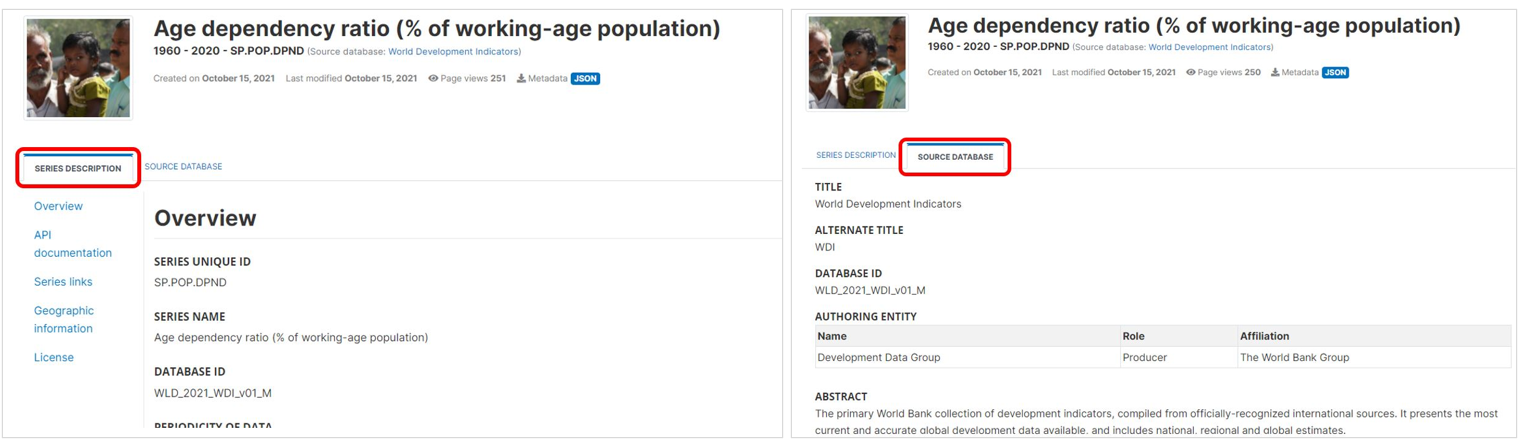
The World Bank has developed a complementary metadata schema for documenting databases or datasets of indicators (i.e., collections of indicators), which we also refer to as datasets. This schema provides metadata at the database level, which can be published independently in a catalog of datasets, or provided as contextual information attached to indicator level. To establish a link between an indicator and its associated database, the indicator metadata schema includes a dedicated element that stores the database identifier, enabling seamless association between indicator metadata and database metadata.
In data catalogs like a NADA catalog, datasets can be made visible as specific entries (a catalog of datasets), and/or the metadata on indicators and the related databases can be combined.
Documenting a dataset
Create a new project
The first step in documenting a database is to create a new project. You do that by clicking on CREATE NEW PROJECT in the My projects page, then selecting Database as data type when prompted. This will open a new, untitled Project page.
In that page, select the template you want to use to document the database. A default template is proposed; no action is needed if you want to use the default template. Otherwise, switch to another template by clicking on the template name in the Templates frame. Note that you can at any time change the template used for the documentation of a project. The selected template will determine what you see in the navigation tree and in the metadata entry pages, but switching from one template to another will not impact the metadata that has already been entered; no information will be deleted from the metadata.
Enter information on metadata
The Metadata information section in the navigation tree (in the Project page) contains elements intended to document the metadata being generated, i.e., metadata about the metadata. All content in this section is optional; it is however recommended practice to document the metadata as precisely as possible. This information will not be useful to data users, but it will be to catalog administrators. When metadata is shared across catalogs, the information entered in the Information on metadata provides transparency and clarity on the origin of the metadata.
INFORMATION ON METADATA
Document titleThe title of the metadata document (which may be the title of the database itself). The "metadata document" is the metadata file (XML or JSON file) that is being generated.Document IDA unique identifier for the database metadata document. This identifier must be unique in the catalog where the metadata are intended to be published. Ideally, the identifier should also be unique globally. This is different from the "Primary ID" in section Database description / Title statement, although it is good practice to generate identifiers that establish a clear connection between these two identifiers. The Document ID could also include the metadata document version identifier. For example, if the "Primary ID" of the World Development Indicators (WDI) database - April 2022 is "WDI_2022-04, the "Document ID" in the Metadata information could be “WB_WDI_2022-04” if the metadata are produced by the World Bank. Each organization should establish systematic rules to generate such IDs. A validation rule can be set (using a regular expression) in user templates to enforce a specific ID format. The identifier may not contain blank spaces.Metadata producersThe metadata producer is the person or organization with the financial and/or administrative responsibility for the processes whereby the metadata document was created. This is a "Recommended" element. For catalog administration purposes, information on the producer and on the date of metadata production is useful.NameThe name of the person or organization who produced the metadata or contributed to its production.AbbreviationThe abbreviation (or acronym) of the organization that is referenced in "Name".AffiliationThe affiliation of the person or organization mentioned in "Name".RoleThe specific role of the person or organization mentioned in "Name" in the production of the metadata.
Production dateThe date the metadata on this database was produced (not distributed or archived), preferably entered in ISO 8601 format (YYYY-MM-DD or YYY-MM). A validation rule can be set in user templates to enforce a date format. This is a "Recommended" element, as information on the producer and on the date of metadata production is useful for catalog administration purposes.VersionThe version of the metadata document (not the version of the database itself).
Enter a description of the database (descriptive metadata)
DATABASE DESCRIPTION
TITLE STATEMENT
Primary IDA unique identifier of the database. For example, the World Bank’s World Development Indicators database published in April 2020 could have Main identifier = “WB_WDI_APR_2020”. The "Primary ID" (also referred to as IDNO) is a unique identification number used to identify the database. A unique identifier is required for cataloguing purpose, so this element is declared as "Required". The identifier will allow users to cite the database properly. The identifier must be unique within the catalog. Ideally, it should also be globally unique; the recommended option is to obtain a Digital Object Identifier (DOI) for the study. Alternatively, the "Primary ID" can be constructed by an organization using a consistent scheme. Note that the schema allows you to provide more than one identifier for a same study (in element "Other identifiers"); a catalog-specific identifier is thus not incompatible with a globally unique identifier like a DOI. A validation rule can be set (using a regular expression) in user templates to enforce a specific ID format. The identifier may not contain blank spaces.Other identifiersThis repeatable element is used to enter identifiers (IDs) other than the "Primary ID" (IDNO). It can for example be a Digital Object Identifier (DOI). The "Primary ID" can be repeated here (the "Primary ID" does not provide a "Type" parameter, so if a DOI or other standard ID type is used as main identifier, it is recommended to repeat it here with the identification of the type).TypeThe type of identifier. For example: “DOI”, or "ISBN".IdentifierThe identifier itself.
TitleThe title is the name by which the database is formally known. Make sure to use a unique title for each distinct database (or version of). It is good practice to include the year of production in the title (and possibly the month, or quarter, if a new version of the database is released more than once a year). For example, “World Development Indicators, April 2020”. Pay attention to the consistent use of capitalization in the title.SubtitleThe database subtitle can be used when there is a need to distinguish characteristics of a database. This element will rarely be used. Pay attention to the consistent use of capitalization in the subtitle.Alternate titleThis can be an acronym, or an alternative name of the database. For example, “WDI April 2020”.Translated titleThe title of the database in a secondary language (if more than one other language, they may be entered as one string, as this element is not repeatable). Special characters should be properly displayed, such as accents and other stress marks or different alphabets.
DESCRIPTION
Authoring entityThis set of five elements is used to identify the organization(s) or person(s) who are the main producers/curators of the database. Note that a similar element is available at the indicator/series level.NameThe name of the person or organization who maintains the contents of the database (back-end). Write the name in full (use the element "Abbreviation" to capture the acronym of the organization, if relevant).AffiliationThe affiliation of the person or organization mentioned in "Name".AbbreviationAbbreviated name (acronym) of the organization mentioned in "Name".EmailThe public email contact of the person or organizations mentioned in name. It is good practice to provide a service account email address, not a personal one.URLA link (URL) to the website of the entity mentioned in name.
AbstractThe abstract is a brief description of the database. It can for example include a short statement on the database scope and coverage (not in detail, as other fields are available for that purpose), objectives, history, and expected audience.Database typeThe type of database.Date createdThis is the date the database was created. The date should be entered in ISO 8601 format (YYYY-MM-DD, or YYYY-MM, or YYYY).Date publishedThis is the date the database was made public. The date should be entered in ISO 8601 format (YYYY-MM-DD, or YYYY-MM, or YYYY).VersionA database rarely remains static; it will be regularly updated and upgraded. The version element is a compound element and contains important information regarding the updating of the database. This includes any extension of the database (adding new series data), appending existing data, correcting existing data, etc.VersionA label for the version. The version specification will be determined by a curator or a data manager under conventions determined by the authoring entity.DateThe date the version was released. The date should be entered in ISO 8601 format (YYYY-MM-DD, or YYYY-MM, or YYYY).ResponsibilityThe organization or person in charge of this version of the database.NotesAdditional information on this version of the database. Notes can for example be used to document how this version differs from previous ones.
Update frequencyIndicates at which frequency the database is updated (for example, “annual” or “quarterly”). The use of a controlled vocabulary is recommended. If a database contains many indicators, the update frequency may vary by indicator (e.g., some may be updated on a monthly or quarterly basis while others are only updated annually). The information provided in "Update frequency" will correspond to the frequency of update for the indicators that are most frequently updated.Update scheduleThe update schedule is intended to provide users with information on scheduled updates. This is a repeatable field that allows for capturing specific dates, but this information would then have to be regularly updated. Often a single description will be used, which would avoid having to regularly update the metadata. For example, “The database is updated in January, April, July, October of each year.”UpdateA description of the schedule of updates or a date entered in ISO 8601 format.
LanguagesThis set of elements is provided to list the languages that are supported in the database.NameThe official name of the language being supported; it is recommended to use a name from the ISO 639-1 language name list.CodeThe code of the language mentioned in "Name", preferably the three letter ISO 639-1 code.
ThemesThemes provide a general idea of the research that might guide the creation and/or demand for the series. A theme is broad and is likely also subject to a community based definition or list. A controlled vocabulary should be used. This element will rarely be used (the element "Topics" will be used more often).IDThe unique identifier of the theme. It can be a sequential number, or the identifier of the theme in a controlled vocabulary.ThemeThe label of the theme associated with the data.Parent IDWhen a hierarchical (nested) controlled vocabulary is used, the "Parent ID" field can be used to indicate a higher-level theme to which this theme belongs.VocabularyThe name of the controlled vocabulary used, if any.URLA link to the controlled vocabulary mentioned in field ‘vocabulary’.
TopicsThe topics field indicates the broad substantive topic(s) that the indicator/series covers. A topic classification facilitates referencing and searches in electronic survey catalogs. Topics should be selected from a standard controlled vocabulary such as the Council of European Social Science Data Archives (CESSDA) topic classification.IDThe unique identifier of the topic. It can be a sequential number, or the identifier of the topic in a controlled vocabulary.TopicThe label of the topic associated with the data.Parent IDWhen a hierarchical (nested) controlled vocabulary is used, the "Parent ID" field can be used to indicate a higher-level topic to which this topic belongs.VocabularyThe name of the controlled vocabulary used, if any.URLA link to the controlled vocabulary mentioned in field `vocabulary’.
KeywordsWords or phrases that describe salient aspects of a data collection’s content. This can be used for building keyword indexes and for classification and retrieval purposes. Keywords can be selected from a standard thesaurus, preferably an international, multilingual thesaurus. The list of keywords can include keywords extracted from one or more controlled vocabularies and user-defined keywords.KeywordA keyword (or phrase).VocabularyThe name of the controlled vocabulary from which the keyword was extracted, if any.URLThe URL of the controlled vocabulary used, if any.
DimensionsThe dimensions available for the series included in the database. For example, "country, year".NameThe name of the dimension.LabelA label for the dimension.
SponsorsThe source(s) of funds for the production and maintenance of the database. If different funding agencies sponsored different stages of the database development, use the role attribute to distinguish their respective contributions.NameName of the funding agency/sponsor.AbbreviationAbbreviation of the funding/sponsoring agency mentioned in "Name".RoleThe role of the funding/sponsoring agency mentioned in "Name".GrantGrant or award number. If an agency provided more than one grant, list all grants separated with a “;”.URLURL of the sponsor agency mentioned in "Name".
AcknowledgmentsAn itemized list of person(s) and/or organization(s) other than sponsors and contributors already mentioned in metadata elements contributors and sponsors whose contribution to the database must be acknowledged. NOTE: Another element ("Acknowledgment statement") is available as an alternative to this itemized list of acknowledgments.NameThe name of the person or agency being recognized for supporting the database.AffiliationAffiliation of the person or agency recognized or acknowledged for supporting the database.RoleRole of the person or agency that is being recognized or acknowledged for supporting the database.URLWebsite URL or email of the person or organization being recognized or acknowledged for supporting the database.
Acknowledgment statementAn overall statement of acknowledgment, which can be used as an alternative (or supplement) to the itemized list provided in "Acknowledgments".ContactsThe contacts element provides the public interface for questions associated with the development and maintenance of the database. There could be various contacts provided depending upon the organization.NameThe name of the contact person that should be contacted. Instead of the name of an individual (which would be subject to change and require frequent update of the metadata), a title can be provided here (e.g. “data helpdesk”).RoleThe specific role of the contact person mentioned in "Name". This will be used when multiple contacts are listed, and is intended to help users direct their questions and requests to the right contact person.AffiliationThe organization or affiliation of the contact person mentioned in "Name".EmailThe email address of the person or organization mentioned in "Name". Avoid using personal email accounts; the use of an anonymous email is recommended (e.g., “helpdesk@….org”)PhoneThe phone number of the person or organization mentioned in "Name".URLThe URL of the agency (typically, a URL to a “contact us” web page)
ErrataA list of errata at the database level. Note that an "errata" element is also available in the schema used for the description of indicators/series.DateThe date the erratum was published.DescriptionA description of the error and measures taken to remedy.
NotesThis element is provided to add notes that are relevant for describing the database, that cannot be provided in other metadata elements.NoteA free-text note.
GEOGRAPHIC COVERAGE
CountriesA list of countries for which data are available in the database. This element is somewhat redundant with the element "Geographic areas". The list of countries should be entered in "Countries".NameThe name of the country.CodeThe code of the country. The use of the ISO 3166-1 alpha-3 codes is recommended.
Geographic areasA list of geographic areas (regions, states, provinces, etc.) for which data are available in the database. This can contain sub-national areas, supra-national regions, or non-administrative area names. The type element is used to indicate the type of geographic area. Countries should be provided in the element "Countries".NameThe name of the geographic area, e.g., "World", "Sub-Saharan Africa", "Low-income countries".CodeThe code of the geographic unit.TypeThe type of geographic area, e.g. "state", "region", or "province".
Note on geographic coverageThe note can be used to capture additional information on the geographic coverage of the database.Bounding boxesThis element is used to define one or multiple geographic bounding box(es), which are the rectangular fundamental geometric description of the geographic coverage of the data. A bounding box is defined by west and east longitudes and north and south latitudes, and includes the largest geographic extent of the dataset’s geographic coverage. The bounding box provides the geographic coordinates of the top left (north/west) and bottom-right (south/east) corners of a rectangular area. This element can be used in catalogs as the first pass of a coordinate-based search. The valid range of latitude in degrees is -90 and +90 for the southern and northern hemisphere, respectively. Longitude is in the range -180 and +180 specifying coordinates west and east of the Prime Meridian, respectively.WestWest longitude of the bounding box.EastEast longitude of the bounding box.SouthSouth latitude of the bounding box.NorthNorth latitude of the bounding box.
Geographic granularityWhereas the "Geographic areas" element lists the various geographic levels for which there is data in the database, the "Geographic granularity" element will provide information on the geographic levels for which information is available in the database. For example: “The database contains data at the national, provincial (admin 1) and district (admin 2) levels.”Geographic area countThe number of geographic areas for which data are provided in the database. The World Bank World Development Indicators for example provides data for 262 different areas (which includes countries and territories, geographic regions, and other country groupings).
TIME COVERAGE AND PERIODICITY
Time coverageThe time coverage is the time span of all the data contained in the database across all series.StartIndicates the start date of the period covered by the data (across all series) in the database. The date should be provided in ISO 8601 format (YYYY-MM-DD, or YYYY-MM, or YYYY).EndIndicates the end date of the period covered by the data (across all series) in the database. The date should be provided in ISO 8601 format (YYYY-MM-DD, or YYYY-MM, or YYYY).
Time coverage noteThe element is used to annotate and/or describe auxiliary information related to the time coverage described in "Time coverage".PeriodicityThe periodicity of the data describes the periodicity of the indicators contained in the database. A database can contain series covering different periods, in which case the information will be repeated for each type of periodicity. A controlled vocabulary should be used.PeriodThe periodicity of the time series included in the database, for example, “annual”, “quarterly”, or “monthly”.
ACCESS, LICENSE AND RIGHTS
Access modesThis repeatable set of elements describes the different modes and formats in which the database is made accessible. When more than one mode of access is provided, describe them separately.TypeThe access type, e.g. “Application Programming Interface (API)”, “Bulk download in CSV format”, “On-line query interface”, etc.URLThe URL corresponding to the access mode mentioned in type.NoteThis element allows for annotating any specific information associated with the access mode mentioned in type.
Database URLThe link to the public interface of the database (home page).Other linksThis field allows for the association of auxiliary links referring to the database.URLThe URL for the associated link.DescriptionA brief description of the link, in relation to the database.
CopyrightThe copyright attached to the database, if any.LicenseThis set of elements is used to describe the access license(s) attached to the database.NameThe name of the license, for example “Creative Commons Attribution 4.0 International license (CC-BY 4.0)”.URLA URL to a description of the license, for example “https://creativecommons.org/licenses/by/4.0/”.NoteAny additional information to qualify the license requirements.
DisclaimerIf the agency responsible for managing the database has determined that there may be some liability as a result of the data, the element may be used to provide a disclaimer statement.Citation requirementThe citation requirement for the database (i.e. how users should cite the database in publications and reports).
TAGS
TagsTags, especially when organized in tag groups, provide a powerful and flexible solution to enable custom facets (filters) in data catalogs.TagA user-defined tag.Tag groupA user-defined group (optional) to which the tag belongs. Grouping tags allows implementation of controlled facets in data catalogs.
Export and publish metadata
The database metadata can be exported to JSON, and saved as a ZIP package as for any other data type.
It can also be published in a NADA catalog using the Publish to NADA option. When a database metadata is published to NADA, it will be displayed in a separate tab in the indicator metadata pages, for all indicators that dentified this database in their metadata element databaseID. If no inficator contains this database ID, the database metadata will not be visible in NADA.