Waze Data#
The Waze for Cities Data program is a free, two-way data exchange empowering public sector decision makers to achieve concrete community impact.
Waze provides information about traffic jams and events that affect road conditions, either from drivers using Waze, a.k.a. Wazers, or from external sources. Wazers provide road reports, or UGIs (User-Generated Incidents), which include detailed information about specific traffic and road conditions. They may issue reports from the location at which they are currently located or, if no longer at the location, within 30 minutes after the event occurred. Waze also provides automatic alerts for what they call Unusual Traffic - incidents that affect a large number of users and fall outside the normal traffic patterns for a given day and time.
Waze traffic data consists of the following information:
General information: time-stamp of the file, geographic area from which the data was retrieved.
Traffic alerts: traffic incidents reported by users.
Traffic jams: traffic slowdown information generated by the service based on a user’s location and speed.
Unusual Traffic (Irregularities): alerts and traffic jams that affect an exceptionally large number of users.
In this project, we are using Traffic Jams dataset
Jams Dataset#
The jams section includes data gathered in real time about traffic slowdowns on specific road segments. The URL includes an array of jams and the start time and date of the report. Waze generates traffic jam information by processing the following data-sources:
GPS location-points sent from users phones (users who drive while using the app) and calculations of the actual speed vs. average speed (on specific time-slot) and free-flowspeed (maximum speed measured on the road-segment)
User-generated reports shared by Waze users who encounter traffic-jams. These appear as regular alerts, and also affect the way we identify and present trafficjams.
Limitations#
We do not know how much the number of users vary across the days
We do not know how users are spatialy distributed
Daily number of jams#
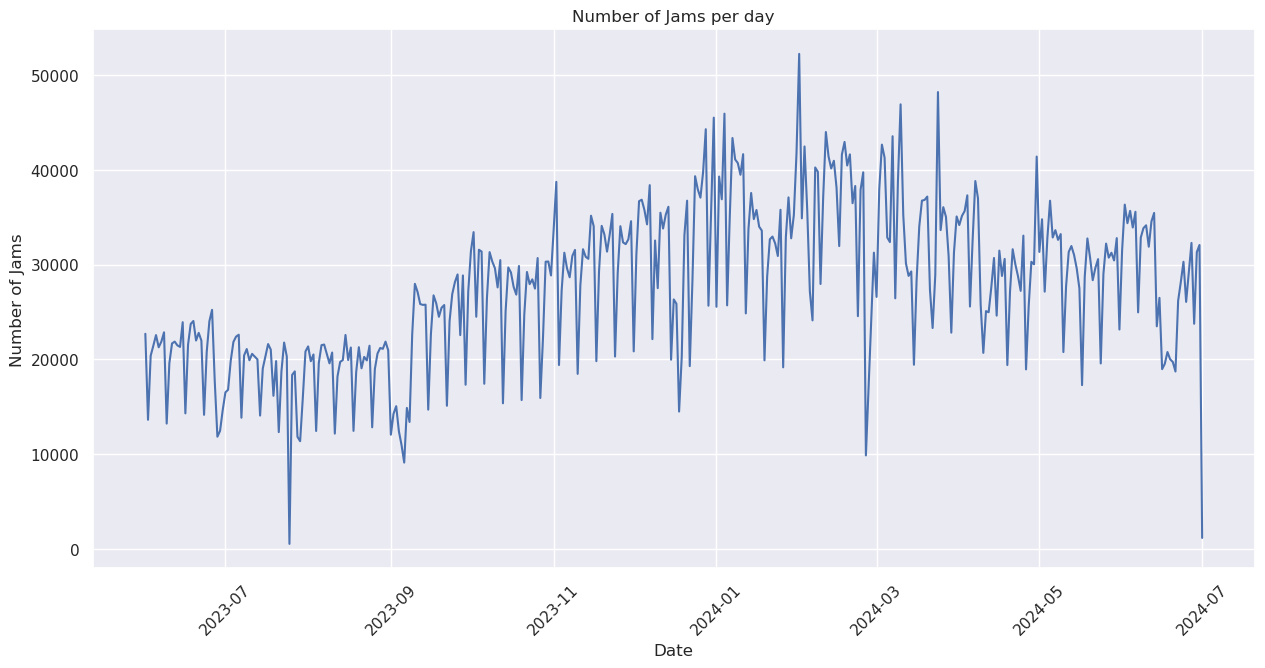
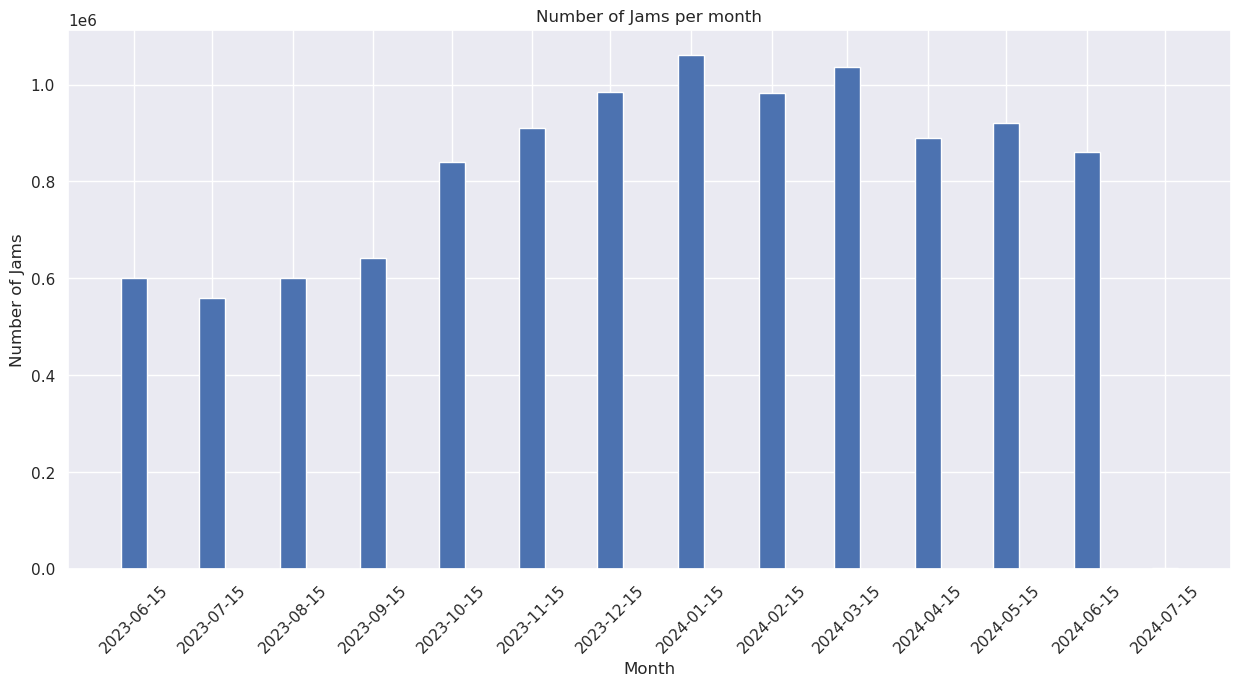
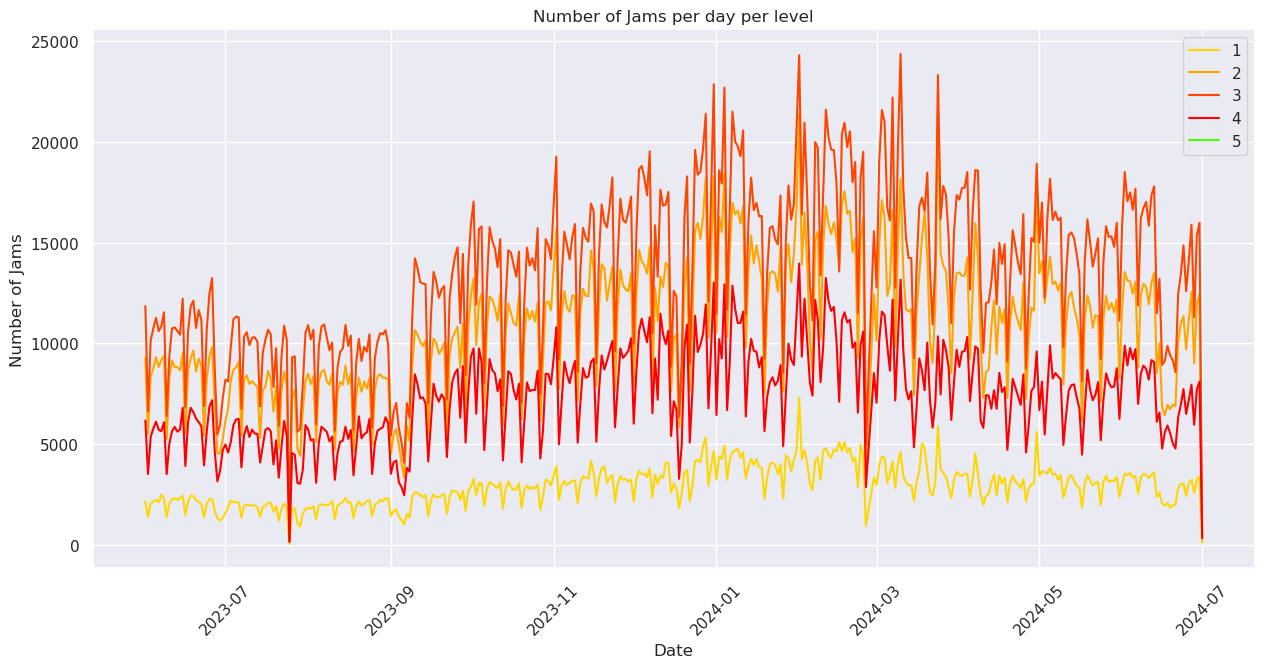
The first plot counts the number of unique jams generated across each day in Baghdad. We can observe what it seems to be a weekly trend. We observe a grow in number of jams towards the end of the year and the beggining of the year. Around April, we observe a drop. Thus, we aggregated the number of jams by month. Finally, we produced the daily number of jams by its level. The level is related to the amount free flow speed is reduced by the jam:
0 = free flow speed to 80% of free flow speed
1 = 80% to 61% of free flow speed
2 = 60% to 41%
3 = 40% to 21%
4 = 20% to 1%
5 = blocked road
Note: We propose doing a weekly rolling average to soften the trend. (Question to the client, will this be useful?)
Show code cell source
plots.jams_per_day(ddf)
Show code cell source
plots.jams_monthly_aggregated(ddf, save_fig = False)
Show code cell source
plots.jams_per_day_per_level(ddf, save_fig = False)
Traffic Congestion Intensity#
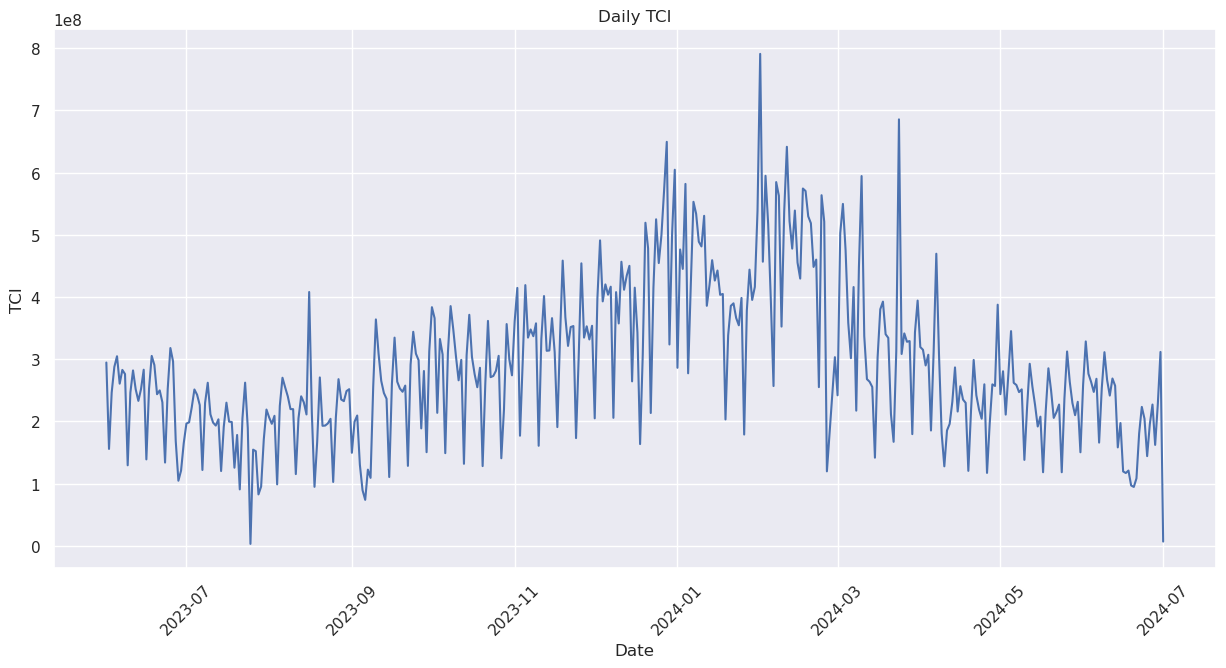
This index tries to not only consider the number of jams but its duration. Every time a jam appears in the waze dataset, we add its length, the more time a jam is seen, the more it contributes to the index. For now, this is done for the whole area of operation.
If this indicator is useful, we can explore weighting it by the reduction in speed, or disaggregate it by level as well.
Show code cell source
plots.regional_tci_per_day(ddf, save_fig = False)
Hourly TCI by group of days#
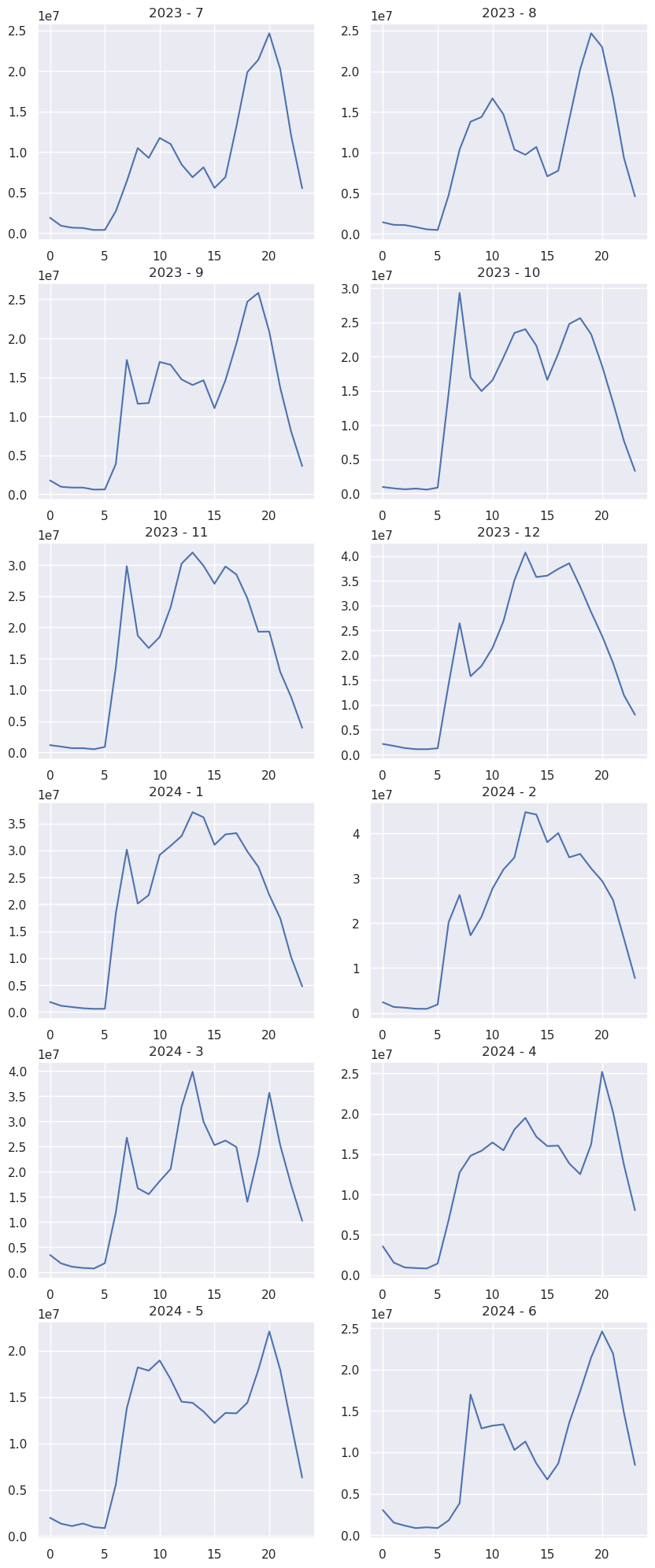
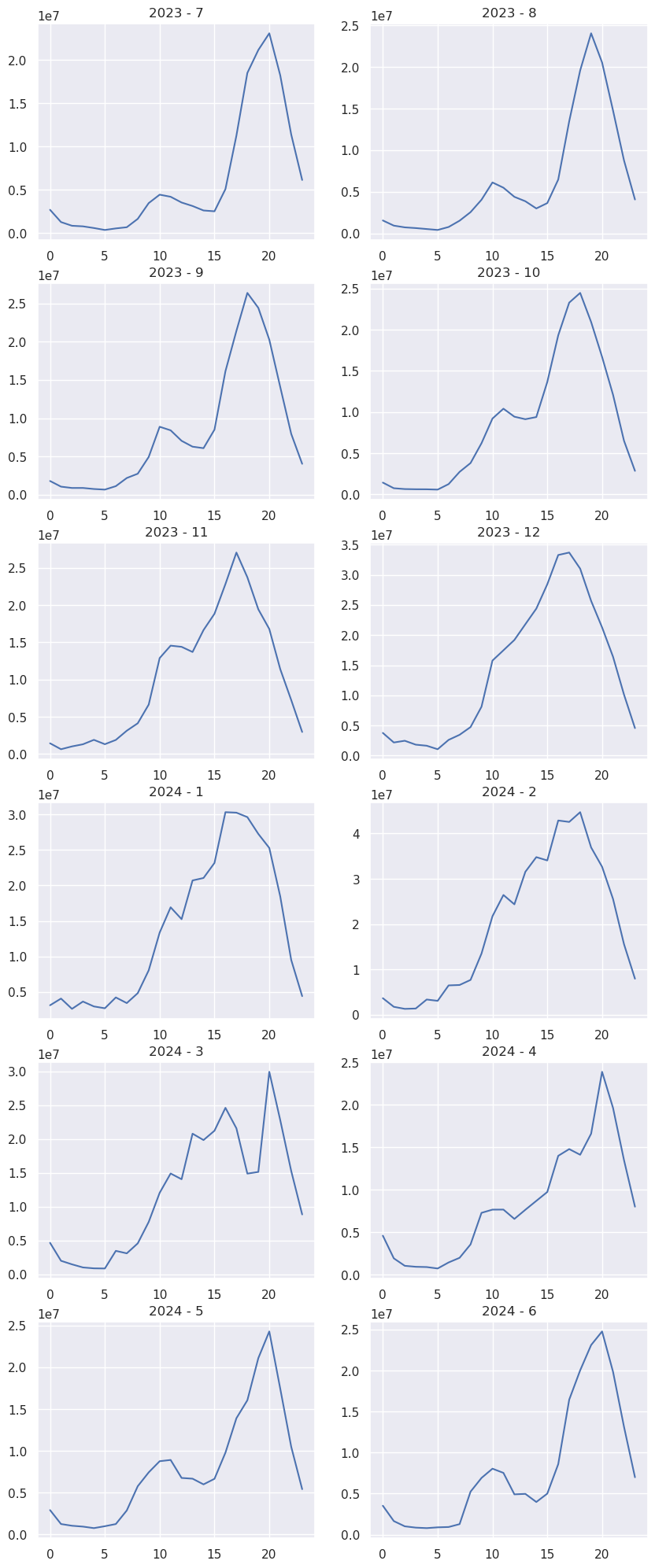
We grouped days considering working schema from Iraq (for client to confirm) Mon-Tue-Wed, Fri-Sat, Thu-Sun. There is an important limitation that we only know when the jam starts but not when it ends. Working days Mon-Tue-Wed: We generally observe the AM/PM peak. Morning peak is not that intense. For some months there are even 3 peaks or even a plateu between the morning and evening peak. Also, the PM peak is rather late, around 20.00 (Brainstorm with the client) Weekends: We observe an evening peak around 20.00 (brainstorm with the client)
Show code cell source
combination_year_month = [(2023, 7), (2023, 8), (2023, 9), (2023, 10), (2023, 11), (2023, 12),
(2024, 1), (2024, 2), (2024, 3), (2024, 4), (2024, 5), (2024, 6)]
plots.hourly_tci_by_month (ddf, date_start='2023-06-01', date_end='2024-06-30', combination_year_month = combination_year_month, save_fig = False, group = 'Mon-Tues-Wed')

Show code cell source
combination_year_month = [(2023, 7), (2023, 8), (2023, 9), (2023, 10), (2023, 11), (2023, 12),
(2024, 1), (2024, 2), (2024, 3), (2024, 4), (2024, 5), (2024, 6)]
plots.hourly_tci_by_month (ddf, date_start='2023-06-01', date_end='2024-06-30', combination_year_month = combination_year_month, save_fig = False, group = 'Sun-Thu')
Show code cell source
combination_year_month = [(2023, 7), (2023, 8), (2023, 9), (2023, 10), (2023, 11), (2023, 12),
(2024, 1), (2024, 2), (2024, 3), (2024, 4), (2024, 5), (2024, 6)]
plots.hourly_tci_by_month (ddf, date_start='2023-06-01', date_end='2024-06-30', combination_year_month = combination_year_month, save_fig = False, group = 'Fri-Sat')
TCI maps by group of days#
The following maps show the mean daily TCI by group of days, Mon-Tue-Wed/Sat-Fri/Sun-Thu, at h3 level 8 for May 2024. This was calculated by:
Calculating the daily TCI for each day and hexagon
Calculating the mean TCI inside each hexagon for each group of days
Mean Daily TCI for Mon-Tues-Wed in May 2024#
Show code cell source
hex_gdf[hex_gdf['TCI_Mon-Tues-Wed']>0][['TCI_Mon-Tues-Wed', 'geometry']].explore(column = 'TCI_Mon-Tues-Wed', cmap = 'Spectral_r')
Mean Daily TCI for Fri-Sat in May 2024#
Show code cell source
hex_gdf[hex_gdf['TCI_Fri-Sat']>0][['TCI_Fri-Sat', 'geometry']].explore(column = 'TCI_Fri-Sat', cmap = 'Spectral_r')
Mean Daily TCI for Sun-Thu in May 2024#
Show code cell source
hex_gdf[hex_gdf['TCI_Sun-Thu']>0][['TCI_Sun-Thu', 'geometry']].explore(column = 'TCI_Sun-Thu', cmap = 'Spectral_r')
Map of Jam lines#
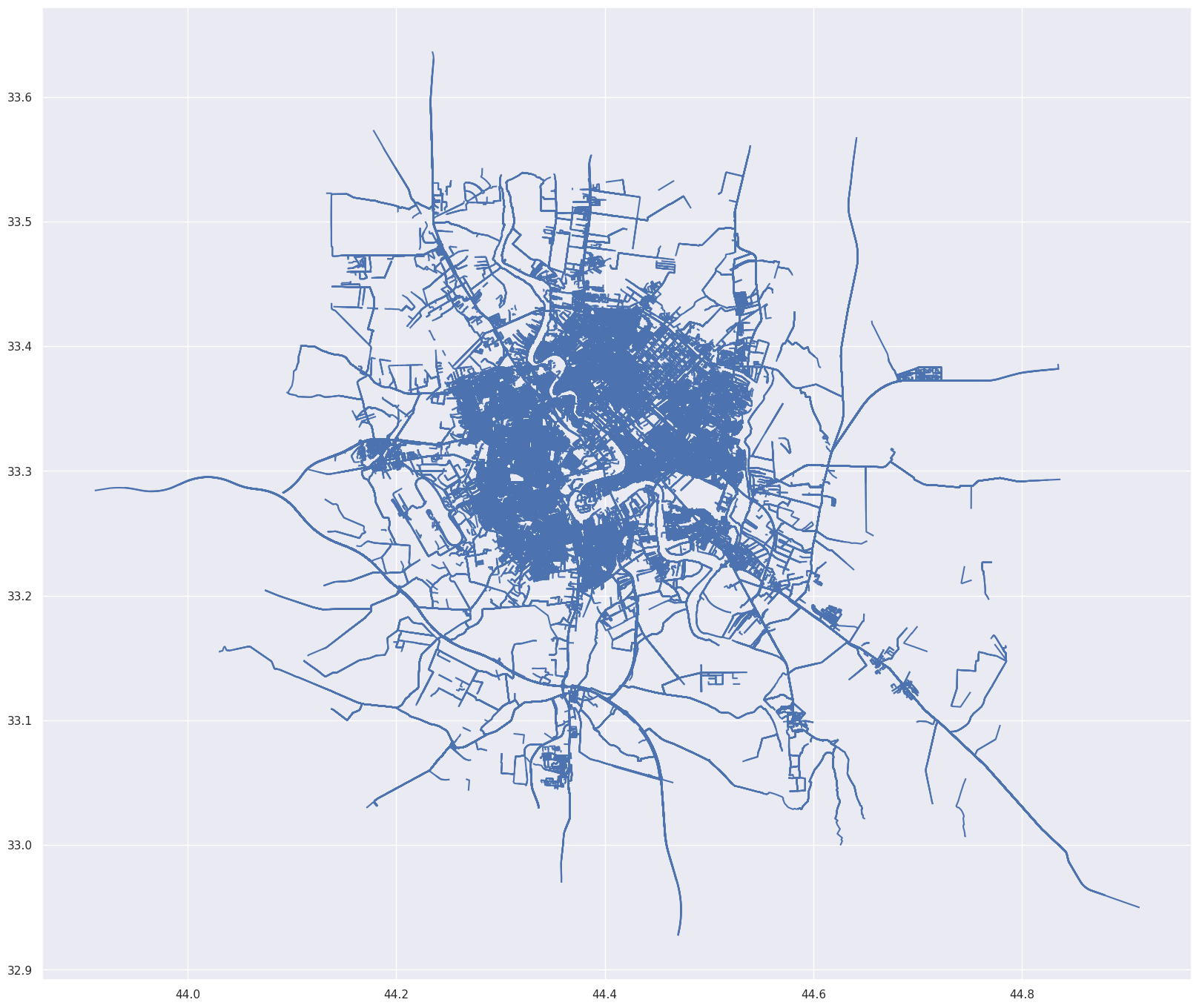
The following map shows jam lines
Show code cell source
# plt.figure(figsize=(30,20))
lines_gdf.plot(figsize = (20,20))
<Axes: >