The problem PCN addresses
Large language models can output numbers that do not match underlying data—numeric hallucination. Citations and RAG improve context but do not guarantee that the digits on screen are faithful. PCN closes that gap by verifying at display time, with policies you control (exact match, rounding, tolerances, aliases).
What PCN enables
You keep your existing stack; PCN adds a verifiable presentation layer so stakeholders see which figures are backed by proof—and which are not.
-
Trustworthy data products
Disseminate AI-assisted summaries of indicators, KPIs, or research figures with verification marks tied to real observations—not guessed decimals.
-
Transparent compliance posture
In regulated or audit-sensitive settings, default to fail-closed: only claim-checked numbers show as verified; everything else stays visibly uncertain.
-
Model-agnostic rollout
Swap or upgrade LLMs without rewriting trust logic—verification is enforced where text becomes UI, independent of which model produced it.
-
Extensible assurance
Start with strict policies; extend toward cryptographic commitments or organization-specific rules as your assurance needs grow.
Where PCN fits
PCN targets numerically sensitive experiences—anywhere a wrong number erodes trust or creates risk.
- Development & official statistics AI dissemination of World Bank–style indicators (e.g. Data360 workflows) where users must see values aligned with source series and metadata.
- Financial reporting & analysis Assistant-generated commentary that references balances, rates, or forecasts—verify displayed figures against your ledger or data feed.
- Science & medical statistics Teaching and research tools where quantitative claims should match datasets or published tables under explicit rounding rules.
- Legal & regulatory Narratives that cite numeric thresholds or filings—surface unverified numbers instead of implying precision the model did not earn.
- Education Tutoring and assessment helpers that quote formulas and results—students and reviewers see which numbers passed verification.
How it works (at a glance)
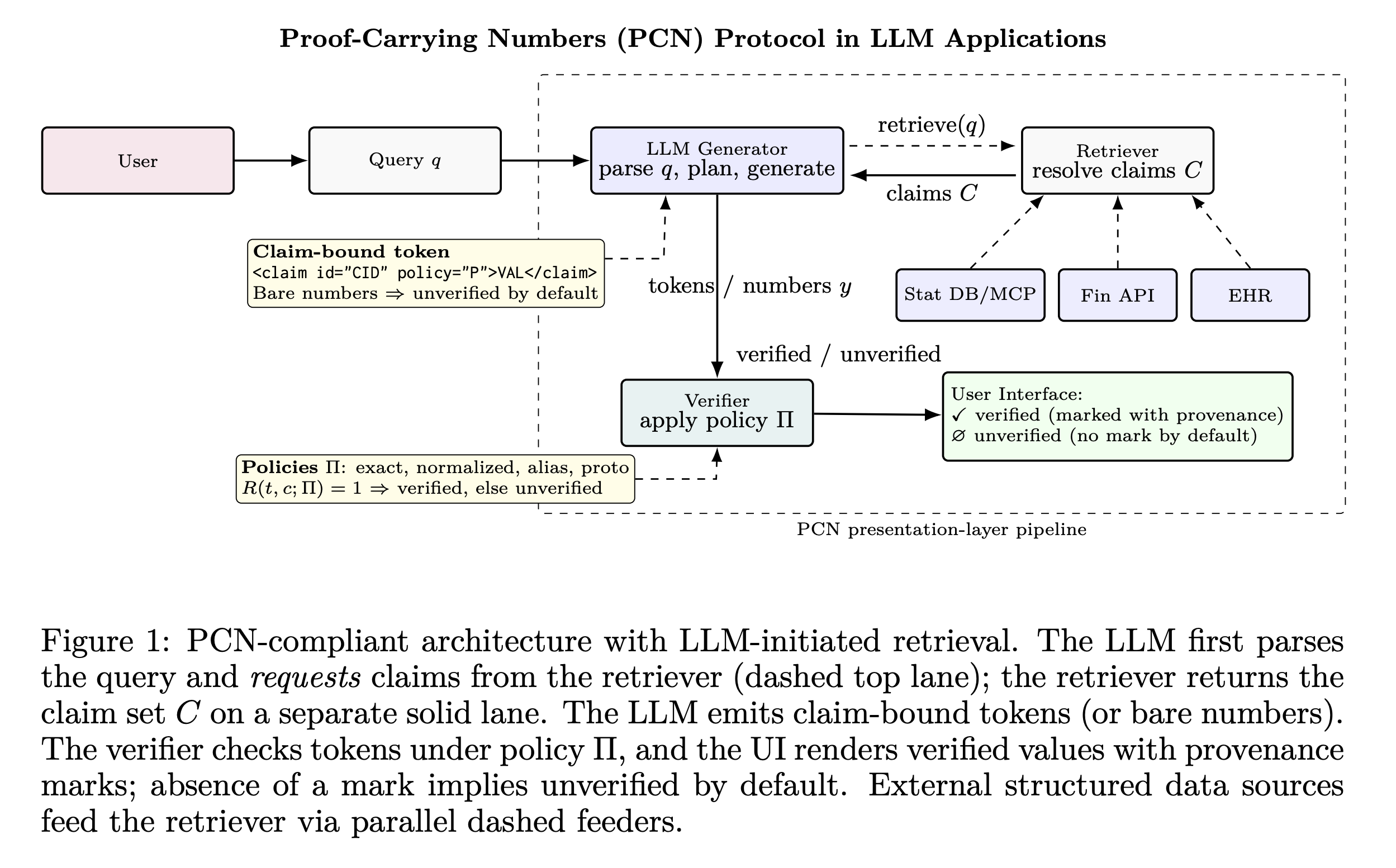
PCN separates generation from verification. The model proposes text; your app binds numeric spans to structured claims and runs a verifier under a declared policy before anything is shown as “verified.”
-
Claim-bound tokens
Numbers are emitted as tokens linked to structured claims (for example identifiers and observed values from your tools or APIs)—not as free-floating digits.
-
Policy-based checking
A verifier evaluates each claim under your policy: equality, rounding, aliases, tolerances with qualifiers—so “about 3%” and “3.0%” can be handled explicitly.
-
Fail-closed by default
Only checks that succeed are marked verified; models cannot self-award trust. Unverified stays visible as such—honest uncertainty beats silent error.
Trust is earned only by proof—the absence of a verification mark communicates uncertainty.
Protocol overview
The diagram below summarizes how PCN ties displayed numbers to verifiable claims in the renderer. (Also available in the repository README.)
For developers
The sections below summarize the monorepo, packages, and quick start. Full guides live in the docs folder on GitHub (GitBook-oriented markdown).
Project structure
PCN is a monorepo: TypeScript packages on npm (@pcn-js/*), Python packages on
PyPI (pcn-*), shared specs, and example apps.
JavaScript / TypeScript (npm)
-
@pcn-js/coreCore protocol: claims, verification, HTML processing—usable without React.
-
@pcn-js/uiReact components: verified/pending claim marks, tooltips, markdown helpers.
-
@pcn-js/data360Data360 preset: claims provider and extractor aligned with get_data-style results.
-
@pcn-js/fixturesShared test fixtures across packages.
Python (PyPI)
-
pcn-coreCore PCN implementation for Python.
-
pcn-fixturesShared fixtures for Python tests.
Integration paths
| Path | When to use |
|---|---|
| Data360 preset |
Tool results shaped like Data360 get_data (e.g.
claim_id, OBS_VALUE, REF_AREA,
TIME_PERIOD) — fastest path with Data360ClaimsProvider.
|
| Custom extractors |
Any tool output shape: register extractors with ClaimsManager, map
your keys, render with ClaimMark.
|
Step-by-step instructions: Integrating PCN in your app · Policy reference · Publishing to npm
Protocol highlights
-
Model-agnostic
Works with any LLM or generator; trust logic stays in your app.
-
Lightweight
Minimal overhead; integrate alongside existing UI and data flows.
-
Formally grounded
Soundness, completeness, fail-closed behavior, and monotonicity—see the paper.
-
Policy-flexible
Exact match, rounding, tolerance bands, aliases—declared per claim.
Quick start
JavaScript / TypeScript
# From repo root
corepack enable
pnpm install
pnpm -r test
pnpm -r build
# Example chat app
pnpm --filter pcn-example-chat-app dev
# http://localhost:5173
Python
# Editable install + tests
python -m pip install -e "python/pcn-core[dev]"
pytest -q python/pcn-core
Resources
arXiv: Proof-Carrying Numbers (PCN) — protocol and formal properties.