2. Round preparation
Question: What must be prepared before starting the experiment?
Rationale
Chapter 1 follows D1’s title error through a round prepared for the walkthrough. This chapter shows how to set up a round so the judge can tell which image the extractor saw and which instructions it followed. Two snapshots of the same table can show different captions or notes, so any human-reviewed annotation needs to describe the exact image the extractor received.
The registration script builds a sample register from the selected files and their source information. The starting policy, schema, and model settings specify how the extractor will run. The starting state records what the team carries into the round, such as prior decisions and open questions. Before extraction, a deterministic initialization tool in the proposed runner would use those inputs to generate the round manifest.
The prepared batch and settings are the inputs for configuring the round in Chapter 3. Recipe 2.3 uses the supplied manifest to show what to check when the proposed runner generates one. The runner would then pass the images and policy to the extractor and its results to the judge. Those shared inputs let the council trace each finding to the evidence and instructions behind it.
Target state
- Each sample has an unambiguous image, provenance, role in the batch, and reference status.
- The manifest names the inputs and identifies the outputs of the proposed round.
Maturity levels
| Level | Steps |
|---|---|
| Foundational | Review a small set of images and prepare a written baseline policy. |
| AI-ready | Register samples, record checksums, and link policy and state versions through a manifest. |
| AI-native | Specify automatic checks that verify the inputs and their versions before model calls. |
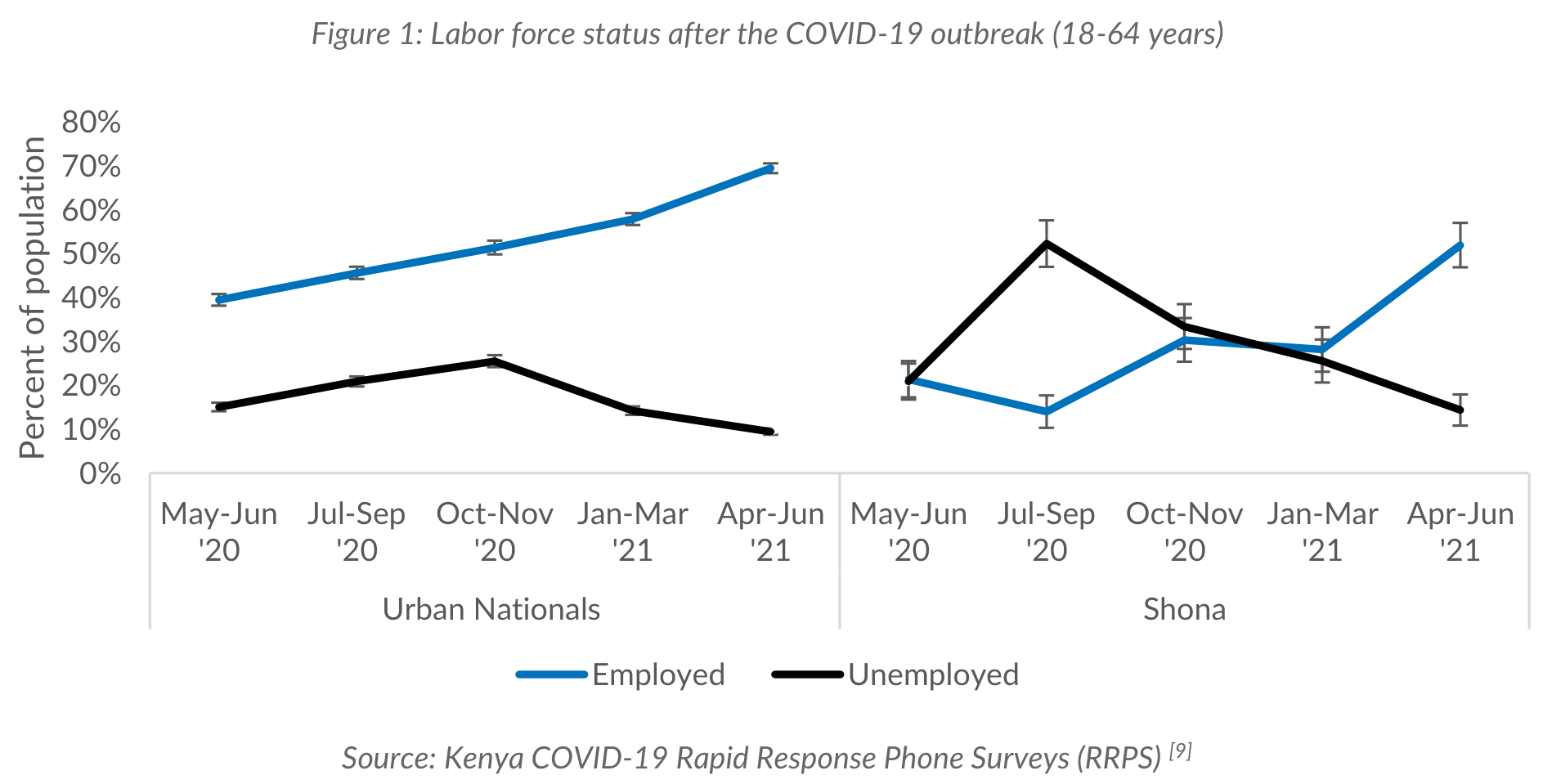
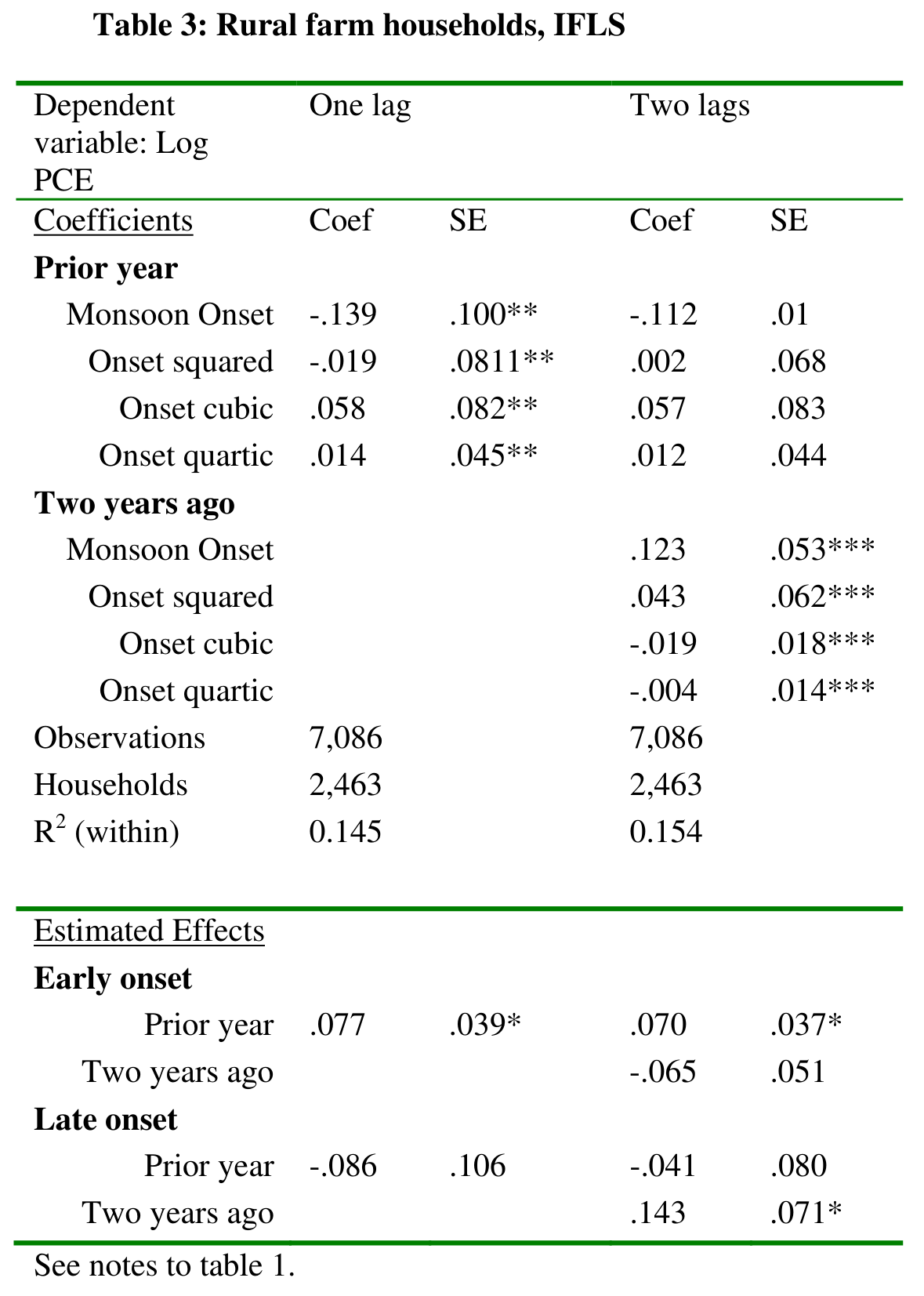
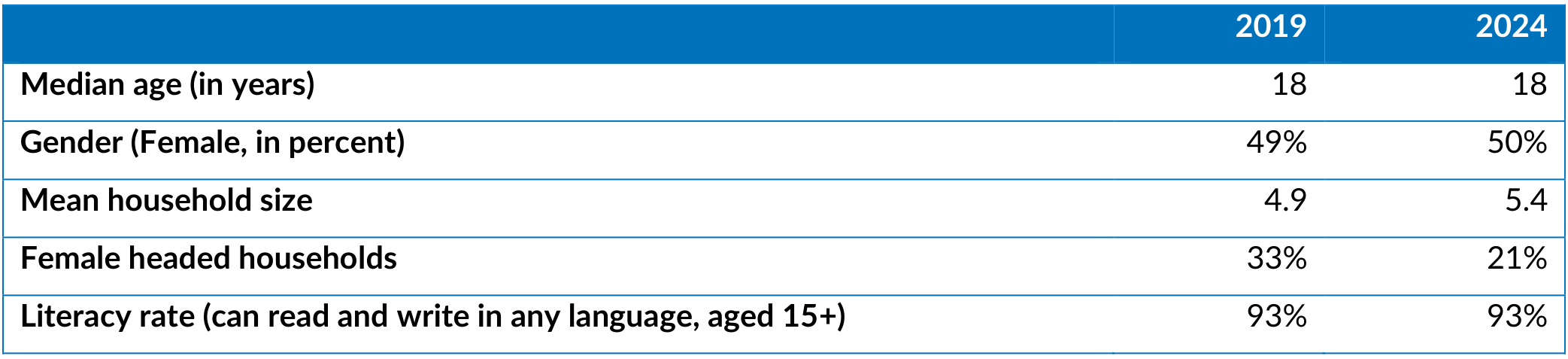
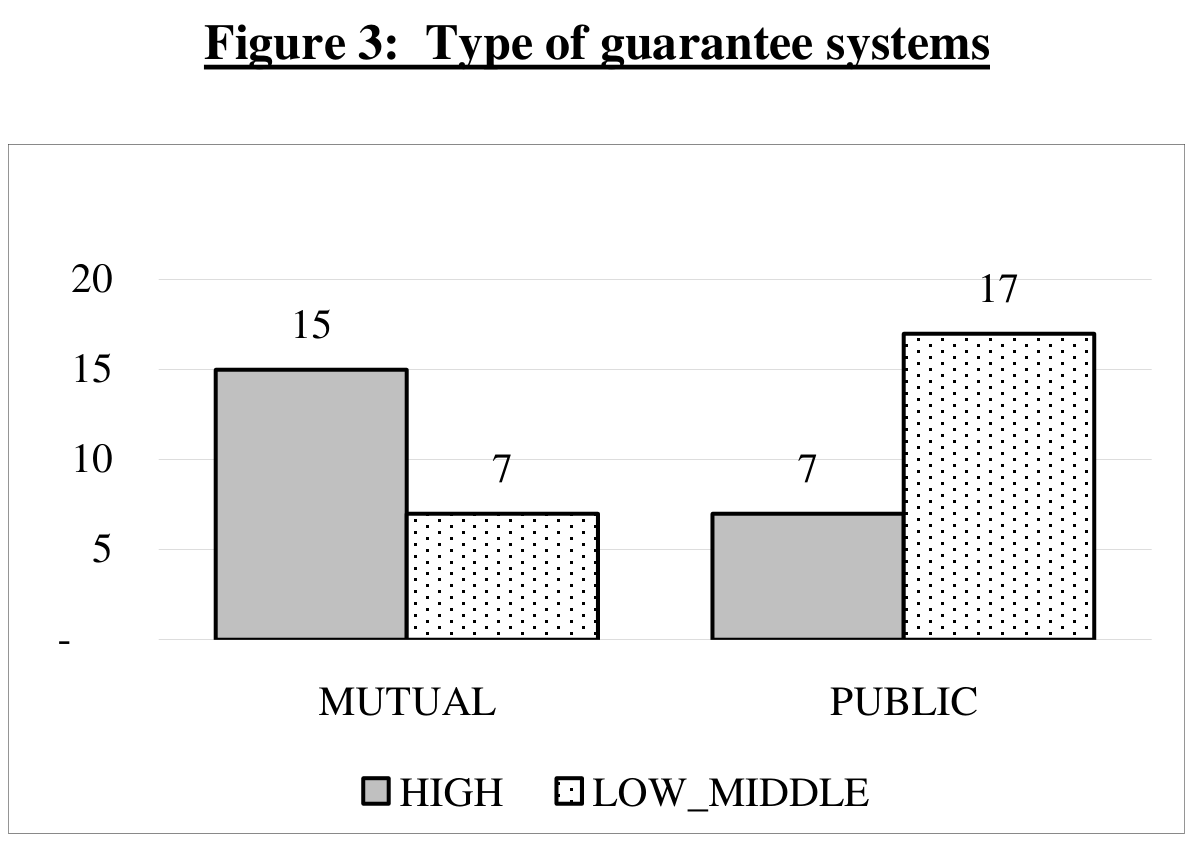
D1 is the Shona labor-force figure. D2 is the rural Indonesia regression table. C1 is the Shona demographics table snapshot. C2 is the WPS4771 guarantee-systems chart. The four images are real. Round 001 is an illustrative exercise.
Recipes
2.1 Register the Discovery and Challenge samples
- Level
- Foundational
- Skills
- Data curator or experiment lead
- Indicative time
- 45 minutes
Result: A completed samples.json register identifies each selected data snapshot, its Discovery or Challenge role, source attribution, annotation availability, and file checksums.
Consider D2, the rural Indonesia regression table in the gallery below. This excerpt from the teaching register shows its PDF page and human-reviewed reference. The reference path is relative to the site's static root.
{
  "sample_id": "D2",
  "split": "discovery",
  "pdf_page": 25,
  "gold_reference": "cookbook-files/data-snapshot-metadata-council/document_11174028_table_007.json"
}
Use the human-reviewed metadata release to identify candidate Discovery samples. Layout annotations identify a region on a PDF page. Semantic references such as D2’s describe the contents of the data snapshot using Schema v1.4.
For a local experiment, use a new directory with one subdirectory per sample. Its name becomes the sample ID, and the parent directory identifies its batch role. Both Discovery and Challenge need at least one sample. The four prepared examples use this layout.
experiment/
  register_samples.py
  batch_sources.csv
  batch/
    discovery/
      D1/  # snapshot.png and metadata.json
      D2/  # snapshot.png and metadata.json
    challenge/
      C1/  # snapshot.png
      C2/  # snapshot.png
The registration script finds one image in each sample directory and pairs Discovery images with metadata.json. It calculates SHA-256 checksums to identify the exact file bytes and writes samples.json. The source CSV provides the attribution that filenames cannot establish.
| CSV column | Contents |
|---|---|
sample_id | The sample directory name, such as D2. |
collection, source_document | The collection and source document identifiers. |
source_pdf, pdf_page | The PDF link or path and the page number, counting the first PDF page as 1. |
provenance | How the image was selected and matched to its source and annotation, including any difference in image boundaries. |
- Select the images and inspect their source PDFs. For Discovery, compare the annotation with visible titles, headings, and notes. For Challenge, check the annotation listing before deciding that a matching reference is unavailable. Reserve separate source documents for future evaluation, keeping related or near-duplicate documents together.
- Create the directory layout above. Save one PNG, JPEG, or WebP image per sample directory, using
snapshot.pngfor the prepared PNG files. Save each Discovery annotation asmetadata.json. Download D1’s image and annotation, D2’s image and annotation, and the images for C1 and C2. - Save the script and source CSV in
experiment/. For another batch, export the same CSV columns from the source catalogue or fill them in using a spreadsheet. Each sample needs one row. Use unique sample IDs across both groups. Start each ID with a letter and use only letters, digits, hyphens, or underscores. Keep source information in the CSV. - With Python 3.10 or later, run the following command from
experiment/. The revision values identify the releases used for the prepared examples. Supply the appropriate revisions for another dataset, or omit those flags for local sources without release revisions.
python3 register_samples.py batch --sources batch_sources.csv --output samples.json \
  --snapshot-revision 626f3c54ba6d8f6e0ba0795f9e544e24b2650faf \
  --gold-revision 859b32f1067737c713d5a3044c6defaea857bf7b
The generated paths are relative to the directory containing samples.json. For example, D2’s local reference path is batch/discovery/D2/metadata.json. An identical rerun reuses the same register. A changed batch requires a new output path in an existing directory, so a rerun preserves the existing record.
Worked example. For the four prepared images, the command reports samples.json: 4 samples registered. The register identifies D1 and D2 as Discovery, with annotation paths and checksums, and C1 and C2 as Challenge, with null references. The source CSV supplies D2’s PDF page 25. Inspecting D2 confirms that its title, dependent variable, lag headings, and footer match the annotation. Attribution and reuse notes
What this does not do. The script checks file associations and that annotations are JSON objects. Schema validation and visual verification establish whether an annotation is suitable for the selected image.
Inspect the four data snapshots
D1. The Shona labor-force chart retains its caption above the plot and its source below the legend.
D2. The rural Indonesia regression table places coefficient and standard-error columns under each lag specification.
C1. The snapshot shows year columns and row labels, including the median-age unit. The image boundaries exclude the caption.
C2. The chart has a printed caption, two categories, and a legend. The vertical axis carries tick values without a unit label.
2.2 Freeze the starting policy and state
- Level
- AI-ready
- Skills
- ML engineer and metadata reviewer
- Indicative time
- 45 minutes
Result: The starting policy, state, schema, and model settings are recorded for the round.
Open the starting policy (P001) and the starting state (S001). Rule R01 in P001 tells the extractor to use the image as its evidence and leave unsupported fields unset or null where the schema permits. S001 records the objective and who can access the human-reviewed annotations.
Keep these files separate. The policy gives the extractor its instructions. The state carries decisions and unresolved questions between rounds.
- Choose the schema and fixed reference extractor. Record provider and model identifier, model revision when available, request settings, and output format. Do the same for the diagnostic judge, three distinct multimodal council models, and the separate synthesis model used by the orchestrator. Fix the judge’s review questions before starting the round.
- Draft the initial policy for the selected model and schema. Use the illustrative starting policy (P001) as an example. Give each rule a stable ID. Specify what the model may use as evidence and how it should handle unsupported fields.
- Initialize the state with the objective, current versions, access policy, and any prior decisions. Start with an empty history when this is the first round.
Worked example. P001 starts with four rules. S001 starts with an empty history because this is the first round. The manifest leaves model identities and execution timestamps null because the round is illustrative.
What this does not do. Recording versions and settings makes the experiment traceable. A hosted model may still return different outputs on repeated requests.
2.3 Check the runner’s round manifest
- Level
- AI-ready
- Skills
- ML engineer
- Indicative time
- 30 minutes
Result: A checked manifest identifies the intended batch, starting versions, settings, and output locations, with any missing configuration noted before startup.
Open the round manifest. Under artifacts.policy, used points to 001_policy.md and next points to 002_policy.md. These two entries distinguish the policy that produced the extraction records from the candidate for the next round. Resolve manifest paths from the folder containing 001_manifest.json.
The proposed runner would generate this manifest before extraction, using the sample register and the policy, state, schema, and model settings chosen in Recipe 2.2. A deterministic tool would calculate input hashes and record output locations. As stages finish, the runner would update status, timestamps, and references to the files saved. The orchestrator model produces the policy, state, and findings. The runner maintains the manifest that points to them.
The supplied manifest is an authored example with execution_status set to not_run. It includes references to the illustrative outputs so the complete round can be followed.
| Artifact type | Contents and lifecycle |
|---|---|
| Extraction policy | The extractor uses P001 in round 001. The orchestrator produces P002 for future use. |
| Cumulative experiment state | S001 enters the round. S002 carries decisions and open questions forward. |
| Extraction results | One record per sample in JSON Lines format, with one JSON object per line. Each record identifies the policy used and contains its metadata output. |
| Round findings | Key issues, decision rationale, rule counts, rejected proposals, and open questions. |
| Council deliberation | Independent proposals, cross-critiques, revisions, and the orchestrator synthesis. |
| Round manifest | Batch membership, model and schema settings, status, timestamps where applicable, and artifact references. |
| Human review | Human decisions on escalated findings and any recorded spot checks. |
| Judge reviews | One structured review per sample, with its reference-comparison status and findings. |
- Compare the manifest’s sample IDs with the generated register. Check that the Discovery and Challenge lists name the intended samples.
- Check that the input paths and versions identify the selected policy, state, schema, and model settings. A future run needs assigned model settings before startup.
- Check where extraction records and judge reviews will be saved. The runner should preserve the starting policy and its outputs when the orchestrator later produces a revised policy.
Worked example. The supplied manifest names D1 and D2 as Discovery and C1 and C2 as Challenge, uses P001 and S001 as inputs, and lists the extraction and judge-review files. Its model fields are null because it describes the teaching example. The preflight check identifies those fields as settings to fill for a future run. Chapter 3 follows the proposed startup sequence.
What this does not do. The manifest records association and provenance. Image support and policy compliance require review.
Implementation options
- Use the supplied script for a local batch and a CSV export from the source catalogue for attribution.
- For repeated batches, call the registration and manifest-initialization tools from the runner. The registration script is supplied here. The runner and its initialization tool are proposed components.
Resources
- The Data Snapshot corpus provides source documents, data snapshots, and layout annotations.
- The semantic gold release provides human-reviewed references and a pinned v1.4 schema.
- The Data Snapshot schema reference documents metadata fields and their validation boundaries.
Common mistakes
- Joining by filename alone can pair a different data snapshot with the annotation.
- Recording the proposed policy as the executed policy breaks comparisons.
- Treating a public dataset split name as evidence of evaluation independence can conceal prior use.
Verification
- Resolve the image paths from the correct register base directory and compare their hashes with the register. For the prepared batch, expect four images and two annotation references.
- Validate each Discovery reference against the schema and verify the matching image by inspection.
- Verify that the manifest points to the starting policy and state and lists where the round will save the extraction records and judge reviews.
Checklist
Ticks are saved in this browser only.