AI for Coding
Day 1: Setup overview
2026-04-20
Minimal and optimal setup requirements
To be able to reproduce examples and follow along with AI for coding in Stata, you need to have a minimal setup in place (or optimal setup if possible). This includes:
![]() Software — Positron, Python, R, Stata, and Quarto
Software — Positron, Python, R, Stata, and Quarto- Stata extension in Positron
- GitHub account on private email
- Access to github.com/worldbank organization
![]() GitHub Copilot activated
GitHub Copilot activated
- WB organization subscription (recommended)
- or private subscription to the Pro plan (fall-back option)
![]() Positron Assistant — connected to Copilot and enabled in Positron
Positron Assistant — connected to Copilot and enabled in Positron- Working folders properly set up with data and code access.



If in doubt, follow the detailed instructions in the prerequisites and verify your setup.
![]() GitHub Copilot: WB vs. Private
GitHub Copilot: WB vs. Private
Why? To get AI code assistance in Positron and GitHub.
| Private Free | WB Organization | Private Copilot Pro | Private Copilot Pro+ | |
|---|---|---|---|---|
| Cost | Free | Free (WB-funded) | ~$10/mo | ~$39/mo |
| Premium requests/mo | 50 | 300 | 500 | 1,500 |
| Advanced models (Claude, GPT) | ❌ | ✅ | ✅ | ✅ |
| Inline completions | ⚠️ Old models | ✅ | ✅ | ✅ |
| Overage billing | N/A | Chargeback process | Credit card | Credit card |
Important
You can only have one active plan. WB access automatically cancels and refunds your private subscription. Switching back requires re-subscribing and is possible at the end of a month.
Premium Requests and Limits
What are premium requests?
Every chat/agent interaction is a premium request (with Claude, GPT-5, Gemini).
Monthly included allowances
| Plan | Req./month |
|---|---|
| WB org | 300 |
| Private Copilot Pro | 500 |
| Private Copilot Pro+ | 1,500 |
Check usage at GitHub Settings → Copilot.
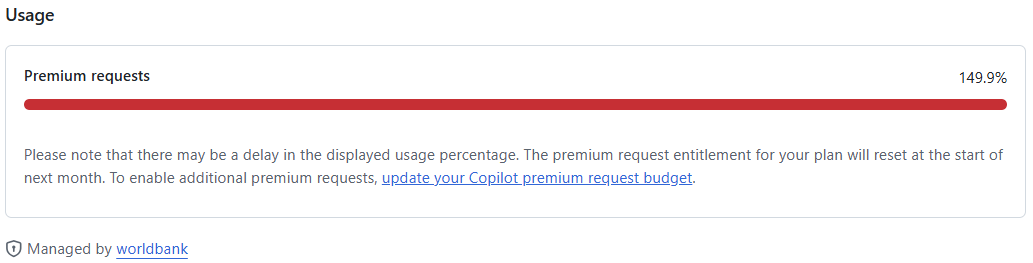
Exhausted your premium requests?
Set a budget (~$0.04/request):
- WB plan → chargeback process
- Private plan → GitHub Billing → Budgets
When your usage reaches 100%, capable AI models stop working.
- Basic inline completions still work.
![]() Positron Assistant
Positron Assistant
The Positron Assistant connects GitHub Copilot to Positron, enabling AI features in the editor and chat.
Enable
- In Positron: Settings (
Ctrl+,) → searchpositron.assistant.enable→ ☑️ - Reload Positron
Connect to Copilot
Ctrl+Shift+P→ Configure Language Model Providers- Select GitHub Copilot
- Sign in → complete GitHub OAuth
Use
- Click chat icon in sidebar (or
Chat: Open Chat) - Type a question → press Enter
- Also provides inline code completions as you type
Tip
You can also sign in via the Accounts icon (bottom-left of Activity Bar).
![]() What about Claude Code?
What about Claude Code?
 What about Claude Code?
Claude Code is an AI coding assistant that calls Anthropic’s Claude API directly — similar to Positron Assistant.
Note
Claude API is not yet approved at WB — currently in review for release next FY.
We access the same Anthropic models (Claude Sonnet/Opus 4.5) through GitHub Copilot.
The LLMs are identical. Differences are only in:
- The interface (Positron Assistant vs. Claude Code)
- System instructions for content management
Warning
Claude Code is not designed for data science and lacks the IDE integration of Positron + GitHub Copilot.