AI for Coding

Day 1: Setup Overview

Eduard Bukin

Distributional Impact of Policies. Fiscal Policy and Growth Department

2024-04-20

Software Setup

Follow instructions on software setup and verification in prerequisites.

  • Thanks to our IT team, all required software is available for installation via Software Center on WB laptops:
  • Stata 19+ MP, Positron (latest), R 4.5.3+, Python 3.13+, Quarto 1.9+, and Git 2.52+
  • Everything except Stata is free and open source - no license required.

If any problems arise: follow the troubleshooting guide or contact ITHelp@worldbankgroup.org.

GitHub Account Setup

Why? To use version control, collaborate with colleagues, and access GitHub Copilot AI features.

1. Create account

2. Join WB organization

Get GitHub Copilot: WB vs. Private

Why? To get AI code assistance in Positron and GitHub.

Private Free WB Organization Private Copilot Pro Private Copilot Pro+
Cost Free Free (WB-funded) ~$10/mo ~$39/mo
Premium requests/mo 50 300 500 1,500
Advanced models (Claude, GPT)
Inline completions ⚠️ Old models
Overage billing N/A Chargeback process Credit card Credit card

Important

You can only have one active plan. WB access automatically cancelles and refunds your private subscription. Switching back requires re-subscribing and is possible in the end of a month.

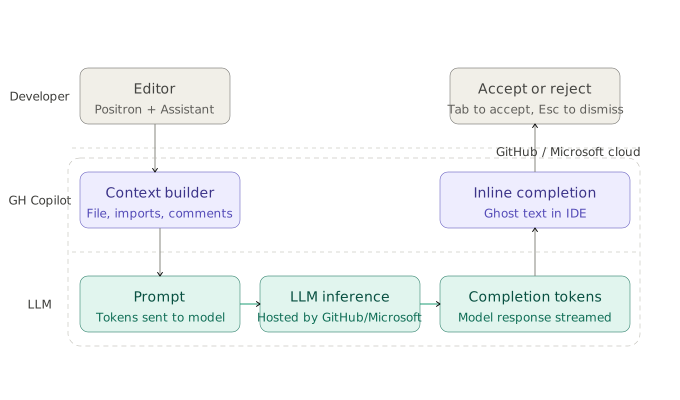
How GitHub Copilot works?

  • GH hosts foundational models (Claude, GPT, Gemini, etc.)
  • Context from your code is optimized and sent to models as tokens
  • User sends messages - requests
  • Each interaction costs one premium request

Premium Requests Limits

What are premium requests? — Every chat/agent interaction interaction with advanced models (Claude Sonette, GPT-5+) consumes (x1-x3) premium request.

Monthly included allowances

Plan Included req/mo
WB org 300
Private Copilot Pro 500
Private Copilot Pro+ 1,500

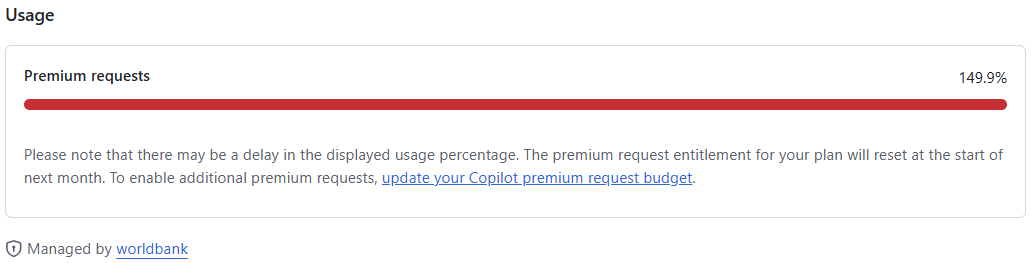
Hit the limit?

Set a budget (~$0.04/request):

When you’ve used all included requests (100%), advanced AI features stop working. Basic inline completions still work (older models).

Access Levels at a Glance

Setup Repos Copilot AI
No GitHub account Public only ❌ None
Personal account (free) + Personal repos ⚠️ Old models only
+ Copilot Pro (private) + Personal repos ✅ 500 premium req/mo
+ Copilot Pro+ (private) + Personal repos ✅ 1,500 premium req/mo
+ WB org member + WB repos ⚠️ No premium requests
+ WB Copilot access + WB repos ✅ 300 premium req/mo
+ WB chargeback + WB repos ✅ 300 + extra at $0.04/req

Recommended: WB Copilot access + chargeback enabled.

Github @ World Bank is more than copilot

Why to use GitHub @ World Bank?

  • It is a modern standard of research and collaboration.

  • Github integration improves your code, version control, and collaboration standard leading to better quality, transparency, and reproducibility.

  • WB Open source https://opensource.worldbank.org/ — builds open source communities and shares open data, software, and research to advance transparent, evidence-based progress toward the SDGs.

  • Viva Engage: stay connected with the community.

  • Support: github@worldbank.org

Positron Assistant

It is needed to connect GitHub Copilot to Positron and use AI features in the editor and chat.

Enable

  1. Settings (Ctrl+,) → search positron.assistant.enable → ☑️
  2. Reload Positron

Connect to Copilot

  1. Ctrl+Shift+PConfigure Language Model Providers
  2. Select GitHub Copilot
  3. Sign in → complete GitHub OAuth

Use

  • Click chat icon in sidebar (or Chat: Open Chat)
  • Type a question → press Enter
  • Also provides inline code completions as you type

Tip

You can also sign in via the Accounts icon (bottom-left of Activity Bar).